=list
Who can use it: Owners only
Shows the ticket staff roles and members, and the ticket log channel.
Usage
=listExample
=listAllow lists everyone added with =setrole, and Log is the channel where ticket logs go.
Support tickets with reasons, staff claims, ratings and points.
Set up the Tickets bot in a few minutes. Do these steps in order.
Invite the bot to the server your subscription is for. Get the invite link from the subscriptions control channel in the Fate Store server: press تعديل, then ارسال الروابط. The bot only works in that server and leaves any other server right away.
Give the bot a role with View Channels, Send Messages, Manage Channels, Manage Roles, Manage Messages, Embed Links, Attach Files, Read Message History and Add Reactions. Administrator is the easy way. Then, in Server Settings > Roles, drag the bot's role above any role it has to give (for example the role from a role-giving reason).
The default prefix is =, for example =settings. Mentioning the bot also works, for example @bot setup. This is handy if you forget the prefix. Inside a ticket, staff can type ticket commands with no prefix at all, like close or اغلاق.
Owners can use every command, including the settings panel and @bot vip. Owners are the subscription owner and the extra owners you add with =setowner @member. See the extra owners with =ownerlist. For anyone else, owner commands do nothing and show no error.
Type @bot setup (or =settings). Pick an option from the menu, then type your answer in the same channel within 60 seconds. The five buttons under the menu switch between general settings, reasons, per-reason settings, the claim and accept system, and ratings. The panel stays open for 5 minutes. Type @bot setup again any time.
Reasons are ticket types, like Support or Purchase. Press تعديل الاسباب, pick اضافة سبب and type the name. Then press تعديل اعدادات الاسباب, pick the reason and set its category, emoji, description, ticket name and roles. Without reasons, every ticket is the same type.
Staff can use ticket commands and the staff buttons inside tickets. Add a role with =setrole @Support (run it again to remove). Managers, owners and members with Administrator count as staff too. See the list with =list.
Managers see every ticket, close tickets for good, give points and handle tickets closed by other staff. Add them with =setmanger @Staff, or in the settings panel with اضافة/ازالة مسؤول. See them with =mangers.
Press تعديل نظام القبول > شات القبول and send a staff-only channel. Each new ticket posts a claim message there. Ticket logs and transcripts go to a text channel named log-tickets. Make one with that name, or the bot makes it on the first ticket.
Send a panel to your ticket channel: =bsetup #tickets <text> for a 🎟 button, or =msetup #tickets <text> for a menu of your reasons. You can attach an image to the command. Both clear the last 100 messages in that channel first. You can also let members open tickets by typing اداره in a channel you set as شات التكت.
A member presses the button or picks a reason, sees 🎟️ تم انشاء تذكرتك #t-sam., and gets a private channel. It shows your opening image and text, their mention, the ticket type and the staff buttons you turned on. If they opened with the button and you have reasons, they pick the type inside the ticket within 2 minutes. Staff claim it, help, then close it.
Examples use the default prefix =. If you changed it, type yours instead.
setowner or from vip). Being the server owner isn't enough.=listShows the ticket staff roles and members, and the ticket log channel.
=list=listAllow lists everyone added with =setrole, and Log is the channel where ticket logs go.
=setroleAdds or removes a role or member from the ticket staff list.
=setrole <@role | @member | ID>=setrole @SupportStaff can use the ticket commands (close, add, call...) and the staff buttons inside tickets. Run it again on the same role or member to remove it. The bot reacts ✅ when added and ☑️ when removed. Managers, owners and members with Administrator are staff already.
=statusShows how many tickets were opened in total and how many are open now.
=status=statusجميع التذاكر is every ticket ever opened, and التذاكر الفعاله is the ticket channels that still exist.
=mangersLists the ticket managers.
=mangers=mangersEach entry is marked (عضو) for a member or (رول) for a role. If there are none you get قائمة المسؤولين فارغة .
=setmangerAdds or removes a ticket manager.
=setmanger <@member | @role | ID>=setmanger @StaffManagers see every ticket, close tickets for good, give admin points and use the manager buttons after a ticket is closed. They can also use =tblock. Run it again on the same member or role to remove it. The bot reacts ✅ or ☑️. You can do the same in @bot setup > اضافة/ازالة مسؤول.
=bsetupSends the ticket panel with a 🎟 button to a channel.
=bsetup <#channel> [description] (+ image)=bsetup #tickets Press the button to open a ticketAdd a description, attach an image, or both. Without either you get يرجى ارفاق الصورة او الوصف مع الامر . Members press 🎟 to open a ticket. If you have reasons, the member picks one inside the new ticket. Without a channel, the bot shows how to use the command.
Heads up: The bot deletes the last 100 messages in that channel before it sends the panel. Use a channel made just for tickets.
=msetupSends the ticket panel with a menu of your ticket reasons to a channel.
=msetup <#channel> [description] (+ image)=msetup #tickets Pick the ticket type belowAdd your reasons first in @bot setup > تعديل الاسباب, or you get يرجى اضافة الاسباب . Add a description, attach an image, or both. Members pick a reason from the menu and the ticket opens with that reason. Each reason can have its own emoji and description.
Heads up: The bot deletes the last 100 messages in that channel before it sends the panel. If you add or change reasons later, send the panel again so the menu updates.
=settingsOpens the ticket settings panel.
=settings@bot setupAlso works as =setup, =setting or @bot setup. Five buttons switch between the menus: تعديل الاعدادات (general), تعديل الاسباب (ticket reasons), تعديل اعدادات الاسباب (per-reason settings), تعديل نظام القبول (claim and accept) and تعديل نظام التقييم (ratings and services). Pick an option, then type your answer in the same channel within 60 seconds. The panel stays open for 5 minutes and only the person who opened it can use it.
=tblockBlocks or unblocks a member or role from opening tickets.
=tblock <@member | @role | ID>=tblock @SamBlocked members get لا يمكنك فتح تذكرة يرجى مراجعة الادارة. when they try to open a ticket. Run it again to unblock. The bot reacts ✅ when blocked and ☑️ when unblocked.
=tblocklistLists the members and roles blocked from opening tickets.
=tblocklist=tblocklistIf nobody is blocked you get قائمة البلوك فارغة .
=helpSends you the list of setup and owner commands in a DM.
=help=helpThe DM also has a Support button that opens the Fate Store server. The bot reacts ✅ if the DM was sent and ❌ if your DMs are closed.
=prefixShows or changes the bot prefix.
=prefix [new prefix | NONE]=prefix !Without a value it shows the current prefix. =prefix NONE (or =prefix اوامر) puts it back to =. Mentioning the bot always works as a prefix, for example @bot prefix. Ticket commands like close work without any prefix inside tickets.
=setavatarChanges the bot's profile picture.
=setavatar <image link> (or attach an image)=setavatar https://example.com/avatar.pngAlso works as =sa. Paste a link or attach the image to the command. If you change it too often you get يرجى الانتظار يتم تغير الاقتار بوقت سريع .
=setbannerChanges the bot's profile banner.
=setbanner <image link> (or attach an image)=setbanner https://example.com/banner.pngAlso works as =sb. Paste a link or attach the image to the command.
=setgameChanges the bot's activity text, or its online status.
=setgame <text> | =setgame status=setgame Nova Lounge supportAlso works as =game. With text, the bot asks you to type a number: 1 Playing, 2 Watching, 3 Listening, 4 Streaming, 0 Cancel. With status, the numbers are 1 Online, 2 Idle, 3 Dnd, 4 Invisible, 0 Cancel. You have 60 seconds to answer.
=setnameChanges the bot's username.
=setname <name>=setname Nova TicketsAlso works as =sn. The name must be 2 to 32 characters. If it fails you get يرجى الانتظار يتم تغير الاسم بوقت سريع ، او الاسم غير صالح .
Heads up: Discord limits how often a bot can change its name. If it fails, wait about 30 minutes or try another name.
=vipOpens the Bot Settings panel to change the bot's name, avatar, banner, activity, status, prefix and owners, or restart it.
=vip@bot vipAlso works as =edit or =fate. Mention the bot (@bot vip) if you don't know the prefix. The panel shows the prefix, who the bot is registered to, when the subscription ends and the subscription number. Pick an option, then type or attach your answer in the same channel within 60 seconds. The panel stays open for 4 minutes and only the person who opened it can use it.
=setserverMoves the bot to another server.
=setserver <server ID>=setserver <new server ID>Also works as =setguild. The bot replies with an invite link for the new server, then leaves the current one. Use that link to add it to the new server. You can also change the server from the subscriptions control channel in the Fate Store server: press تعديل, then تغير السيرفر.
Heads up: The bot leaves your server right away. Double-check the server ID, and keep the link it sends.
=ownerlistLists the extra owners you added.
=ownerlist=ownerlistThe subscription owner is not shown here. If you haven't added anyone you get قائمة الاونرات فارغة .
=setownerAdds or removes an extra bot owner.
=setowner <@member | ID>=setowner @OmarAlso works as =owners. Owners can use every command, including the settings panel and =vip. Run it again on the same member to remove them. The bot reacts ✅ when added and ☑️ when removed.
=restartRestarts the bot.
=restart=restartThe bot reacts 👾 and comes back after a few seconds. Your settings and tickets are kept.
Heads up: Anything open at that moment (panels, waiting replies, pending accept requests) is cancelled.
=mypointsShows your admin points, or another staff member's.
=mypoints [@member | ID]=mypointsThe reply looks like ✨ @Omar 12. Inside a ticket you can type it without the prefix (mypoints or نقاطي). Anywhere else, use the prefix: =نقاطي.
pointsShows the admin points leaderboard, or a member's points, and lets managers change them.
points [@member | ID] [number | +number | -number] | points reset [@member | @role]points @Omar +5Works in any channel, with or without the prefix (points, =points or نقاط). On its own it shows Admin Points, 10 staff per page, with ⬅ ➡ buttons for 2 minutes. With a member it shows ✨ @Omar 12. Add +5, -5 or 10 to add, remove or set points; only ticket managers, members with Administrator and the subscription owner can do this, and it is logged. points reset @member or points reset @role clears those points. points reset alone asks to clear everyone, and you have 15 seconds to confirm.
Heads up: Resetting can't be undone.
=pointsmShows and edits ticket manager points.
=pointsm [@member | ID] [number | +number | -number] | =pointsm reset [@member]=pointsm @Omar +2Managers get 1 manager point each time they close a ticket. On its own it shows Mangers Points. With a member and +2, -2 or 5 it adds, removes or sets that manager's points. =pointsm reset @member clears one manager, and =pointsm reset asks to clear all (15 seconds to confirm). Only ticket managers, members with Administrator and the subscription owner can use it.
Heads up: Resetting can't be undone.
ticketpointsShows the admin points leaderboard.
ticketpointsticketpointsWorks in any channel, with or without the prefix. Shows 10 staff per page with ⬅ ➡ buttons for 2 minutes, and your own rank under the list.
=ticketpointsmShows the ticket manager points leaderboard.
=ticketpointsm=ticketpointsmShows 10 managers per page with ⬅ ➡ buttons for 2 minutes. Managers get 1 point each time they close a ticket.
addAdds a member to the current ticket so they can see it and write in it.
add <@member | ID>add @SamType it inside a ticket, with or without the prefix (add or =add). Arabic works too: اضافة @Sam. The bot reacts ✅ and writes اضافة الى التذكرة in the ticket log.
callSends the ticket owner a DM asking them to check their ticket.
call [@member | ID]callType it inside a ticket, with or without the prefix (call, =call or استدعاء). Without a member it calls the ticket owner. The DM says يرجى الاطلاع على تذكرتك , #ticket. The bot reacts 🟢 if the DM was sent and 🔴 if the member's DMs are closed.
closeCloses the current ticket.
closecloseType it inside a ticket, with or without the prefix (close, =close or اغلاق). The member, added members and the staff member who claimed the ticket lose access right away. If a ticket manager closes it, the ticket is deleted after 5 seconds (or moved to Closed Tickets if saving closed tickets is on) and the manager gets 1 manager point. If other staff close it, the bot asks a manager to pick an action: اضافة المسؤول, اضافة نقطه or اغلاق التذكرة. A transcript link goes to the ticket log.
deleteDeletes the current ticket right away.
deletedeleteType it inside a ticket, with or without the prefix (delete, =delete or حذف). The ticket log gets a حذف تذكرة entry with the messages attached as a text file (save.txt).
Heads up: There is no confirmation and no manager step. The channel is deleted for good, even if saving closed tickets is on.
evaluationSends a member a rating button so they can rate the service they got.
evaluation [@member | ID]evaluationInside a ticket, type evaluation or تقييم and the bot DMs the ticket owner. Outside a ticket, use the prefix and mention the member: =تقييم @Sam. The DM has the rating message, your server name and a تقييم button. The member writes at least 5 characters, and the rating is posted as an image in the rating channel and logged in the rating log. Set it up first in @bot setup > تعديل نظام التقييم.
importantMarks the ticket as important and moves it to your important category.
importantimportantType it inside a ticket, with or without the prefix (important, =important or مهم). The bot reacts 📌. Set the category first in @bot setup > تعديل الاعدادات > كاتوقري مهم. If no category is set, the command does nothing.
نقطهGives a staff member 1 admin point for this ticket.
نقطه <@member | ID>نقطه @OmarOnly ticket managers (members or roles added with =setmanger) can use it, inside a ticket, with or without the prefix (نقطه or نقطة). For anyone else it does nothing. The bot reacts ✅ and writes اضافة نقطه in the ticket log.
removeRemoves a member from the current ticket.
remove [@member | ID]remove @SamType it inside a ticket, with or without the prefix (remove, =remove or ازالة). Without a member it removes the ticket owner, and the ticket then counts as closed so they can open a new one. You can't remove a ticket manager: لا يمكنك ازالة المسؤول .
renameRenames the current ticket channel.
rename <new name>rename sam-paymentType it inside a ticket, with or without the prefix (rename, =rename or اسم). The bot reacts ✅ and logs the old and new name.
Heads up: Discord only lets a channel be renamed twice every 10 minutes. Extra renames are ignored.
servicesPosts a services card (image) for a member in your services channel.
services <@member | ID> <services>services @Sam Logo designInside a ticket you can type it without the prefix (services or خدمات). Outside a ticket, use the prefix: =خدمات @Sam Logo design. The card shows the member's name, avatar and the text you wrote, and the services log gets a نظام الخدمات entry. Turn it on first in @bot setup > تعديل نظام التقييم: نظام الخدمات, شات الخدمات and صورة الخدمات. If any of these is missing, nothing happens.
Heads up: Always mention the member first.
What each panel and menu does, and how to set it up.
The main switches for your ticket system: channels, buttons, images, cooldowns, idle tickets, notes and responsibilities.
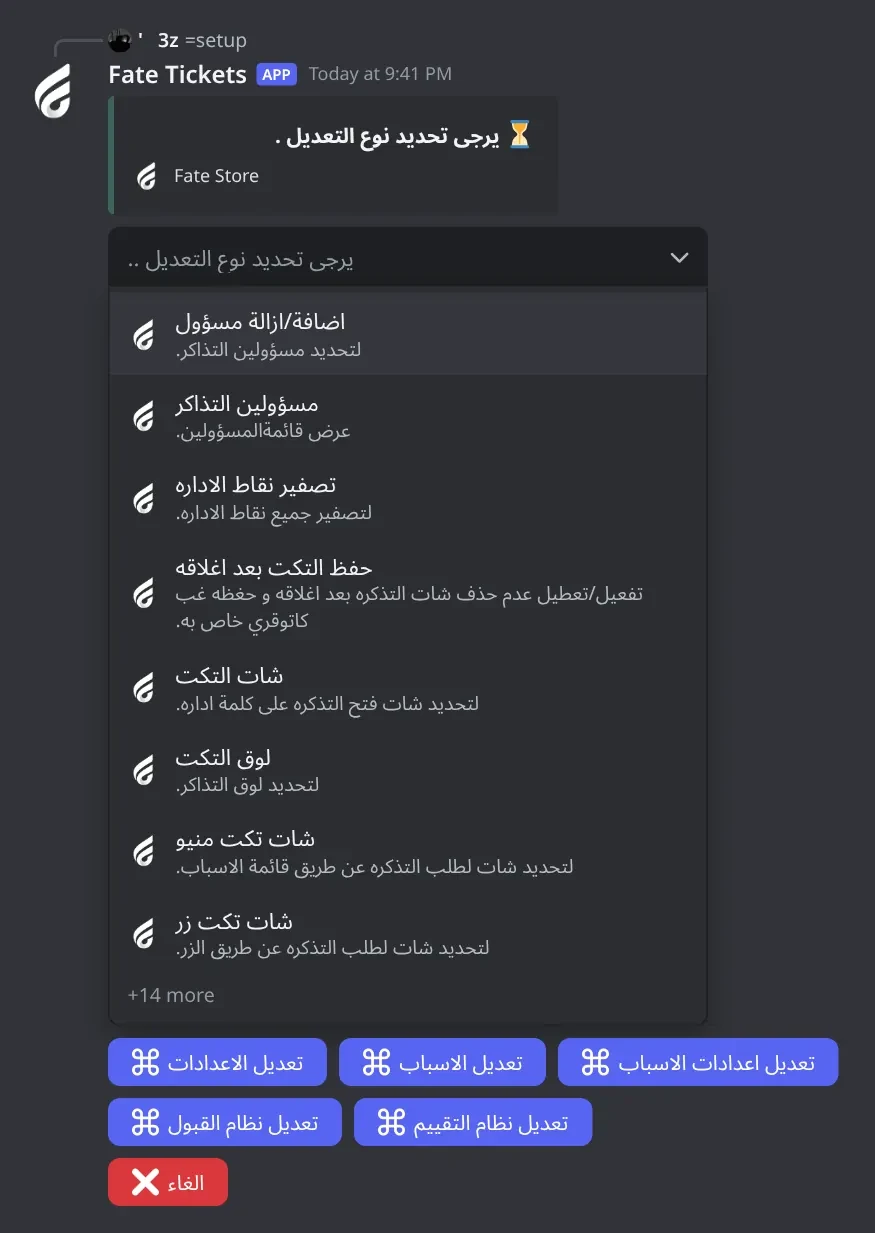
اضافة/ازالة مسؤول and مسؤولين التذاكر: add, remove and list ticket managers.تصفير نقاط الاداره: reset all admin points at once.حفظ التكت بعد اغلاقه: keep closed tickets in a Closed Tickets category instead of deleting them.شات التكت: the channel where typing اداره opens a ticket.شات تكت منيو and شات تكت زر: send the menu or button panel to a channel.كاتوقري مهم: the category the important command moves tickets to.ترقيم التكت, منشن الرولات داخل التكت, زر الاستدعاء, زر اقفال التكت: on/off switches.تحديد رول لاظهار التكت and عرض رولات المضافة: roles that see every ticket.الصورة المرسله عند فتح التكت and الكلام المرسل عند فتح التكت: the image and text at the top of every ticket.المدة بين كل تكت, المدة بين قبول كل تكت, مدة التكت الخامل لحذفه: cooldowns and the idle time.اعداد الملاحظات and اعداد المسؤوليات: open the notes and responsibilities panels.@bot setup.زر اقفال التكت off and wondering why tickets have no close button. All ticket buttons are off until you turn them on.30. Use 30m, 2h or 1d.Add, remove and list ticket reasons (ticket types).
اضافة سبب: type a new reason name.ازالة سبب: type the name of the reason to remove.عرض الأسباب: list your reasons.@bot setup and press تعديل الاسباب.اضافة سبب and type the name.=msetup so members see the new reasons.Give each reason its own category, claim channel, name, emoji, description, messages and roles.
الكاتوقري للسبب and شات قبول للسبب: where its tickets open and where its claim messages go.اسم التكت للسبب, ايموجي للسبب, وصف للسبب: the ticket name and how the reason looks in the menu.رسالة التكت للسبب and رسالة القبول للسبب: its own opening and claim messages.سبب لاعطاء رول (صور , هير): give a role and delete the ticket after 5 seconds.سبب لفتح تكت (نيو), (سجن), (بلاك لست): post a 🎟 button for this reason in another channel.تحديد رول للسبب and عرض رولات للسبب: roles that see only this reason's tickets.حذف السبب: delete the reason.@bot setup and press تعديل اعدادات الاسباب.يرجى تحديد السبب ...تعديل اعدادات الاسباب again to edit another reason.الكاتوقري للسبب. Send the category ID.حذف السبب by mistake. It deletes right away with no confirmation.Decide how staff take new tickets: a claim message in a staff channel, a claim button inside the ticket, or an accept request before the ticket opens.
شات القبول: the staff channel for claim messages and accept requests.رسالة القبول: the mention sent with each claim message (default @everyone).الاستلام من داخل التذكره: a استلام button inside the ticket instead of a claim message.نظام القبول: tickets open only after a staff member accepts.صورة القبول and صورة الاستلام: images for accept and claim messages.حذف رسالة القبول: delete the message 5 seconds after it is used.زر تغير الاداري: the طلب اداري اخر button inside tickets.المدة بين قبول كل تكت: how long a staff member waits between accepts.@bot setup, press تعديل نظام القبول and pick شات القبول.رسالة القبول to your staff role mention, like @Support.نظام القبول without a claim channel. Tickets then open straight away.الاستلام من داخل التذكره is on. With it on, staff claim from inside the ticket.Let members rate the help they got, and post services cards.
نظام التقييم, شات التقييم, لوق التقييم: turn ratings on and choose where they go.رسالة التقييم and صورة التقييم: the message with the button, and the rating image background.احداثيات صورة التقييم: place the avatar, name and text on the image.نظام الخدمات, شات الخدمات, لوق الخدمات, صورة الخدمات, احداثيات صورة الخدمات: the same for services cards.@bot setup and press تعديل نظام التقييم.نظام التقييم.شات التقييم and لوق التقييم.صورة التقييم, then place the items with احداثيات صورة التقييم and press ✅.تقييم to send the member a rating button.لوق التقييم. تقييم then replies يرجى تحديد روم لوق التقييم في الاعدادات.نظام التقييم off. Ratings aren't posted or logged.Short notes shown to the member in every new ticket.
إضافة ملاحظة: type a note (up to 15).إزالة ملاحظة: pick notes to delete.قائمة الملاحظات: list them.@bot setup and pick اعداد الملاحظات.إضافة ملاحظة and type the note within 30 seconds.Groups of staff that a ticket can be sent to from a menu inside the ticket.
تفعيل النظام / تعطيل النظام: turn it on or off.إضافة مسؤولية and ازالة مسؤولية: add or delete a group (up to 25).إدارة مسؤولية: set the group's members.عرض المسؤولية: see a group's members.@bot setup and pick اعداد المسؤوليات.إدارة مسؤولية, choose the group and mention all its members in one message.❌ لا يوجد مسؤولين لهذه المسؤولية.A message with a 🎟 button that opens a ticket.
=bsetup #channel <text>, with or without an attached image.=bsetup #tickets Press the button to open a ticket and attach an image if you want.يرجى ارفاق الصورة او الوصف مع الامر .A message with a menu of your reasons. Members pick one to open a ticket of that type.
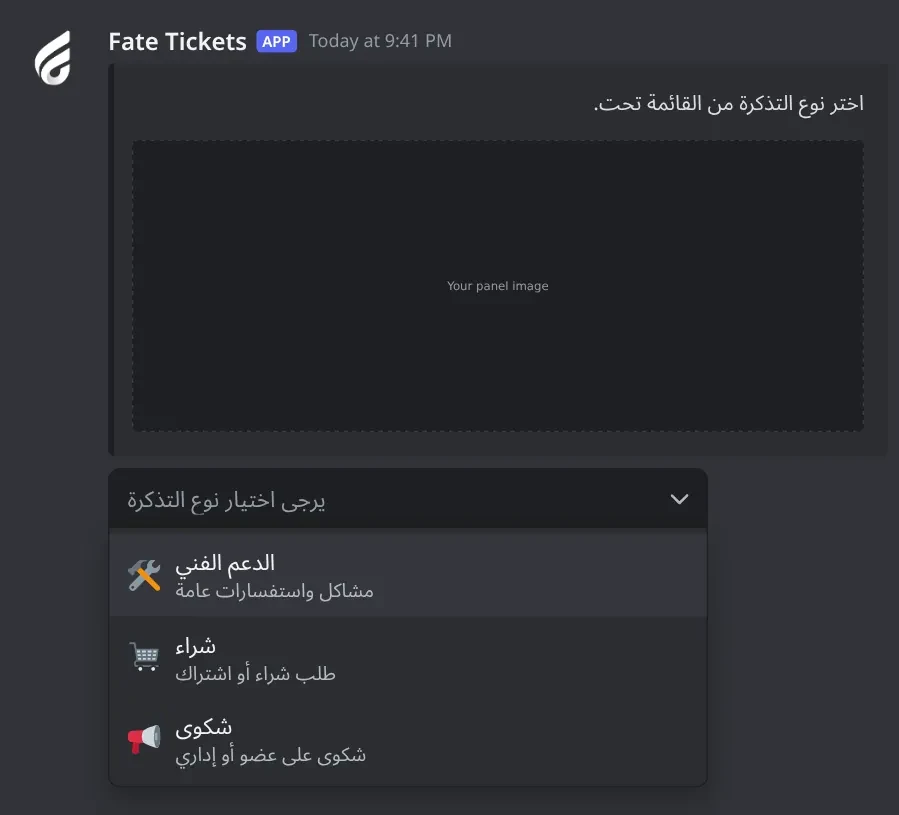
=msetup #channel <text>, with or without an attached image.يرجى اختيار نوع التذكرة: the reasons menu.@bot setup > تعديل الاسباب.=msetup #tickets Pick the ticket type below.يرجى اضافة الاسباب .What the member and staff see when a ticket opens, and the buttons they use.

اغلاق: close the ticket (staff).استلام: claim the ticket (staff, only with in-ticket claiming on).استدعاء: DM the member to come back (staff, once every 5 minutes).طلب اداري اخر: remove the current staff member and ask for another (staff).close, delete, add, remove, rename, call, important, تقييم, نقطه, with or without =.زر اقفال التكت and زر الاستدعاء in general settings, الاستلام من داخل التذكره and زر تغير الاداري in the accept menu.ليس لديك صلاحيات لاستخدام هذا الزر .The message in your claim channel that lets a staff member take a new ticket.
شات القبول in تعديل نظام القبول.رسالة القبول and صورة الاستلام.Tickets only open after a staff member accepts the request.
شات القبول.نظام القبول.المدة بين قبول كل تكت.⌛ لديك طلب قائم يرجى الانتظار.How tickets close, and what managers do after regular staff close one.
اضافة المسؤول: give the claiming staff member access again.اضافة نقطه: give the claiming staff member 1 admin point.اغلاق التذكرة: close the ticket for good.close or press اغلاق.log-tickets (Ticket button).اغلاق التذكرة.delete when you want a transcript link. delete removes the ticket at once and only logs a text file.حفظ التكت بعد اغلاقه is on. It moves to Closed Tickets instead.Members rate the help they got. Ratings are posted as an image and logged.

تقييم (staff, inside a ticket): DM the member a rating button.تقييم button (member): open the rating form.التقييم field: the rating, at least 5 characters.تعديل نظام التقييم.تقييم in it.تقييم after the ticket is gone. Use =تقييم @member instead.Admin points reward staff for tickets. Manager points count tickets each manager closed.
نقاط or ticketpoints: admin points leaderboard.نقاط @member +5 | -5 | 10: change points (managers).نقطه @member inside a ticket, or the اضافة نقطه button: +1 point (managers).=pointsm and =ticketpointsm: manager points.=points reset and =pointsm reset: clear points.=setmanger.نقطه @member or the اضافة نقطه button.نقاط.نقطه. Only managers can, so add yourself with =setmanger.Change how the bot looks and who controls it.
اسم البوت, افتار البوت, بنر البوت: name, avatar and banner.لعب البوت and حالة البوت: activity and status.برفكس البوت: the prefix.اضافة/ازالة اونر and عرض قائمة الاونرات: owners.تغير لون الامبيد: embed colour.ازالة افتار البوت, ازالة بنر البوت, اعادة تشغيل.@bot vip.تعديل > تغير السيرفر) or =setserver.Something not working? Check these first.
= or mention the bot, for example @bot setup.=ownerlist.تعديل > تغير السيرفر.=setrole @role, or make them managers with =setmanger.نقاط, ticketpoints) work anywhere.اداره does nothing@bot setup > شات التكت.اداره, ادارة, الاداره or الادارة.=tblocklist) or already have a ticket.=msetup).تعديل اعدادات الاسباب > سبب لاعطاء رول (صور , هير).زر اقفال التكت and زر الاستدعاء in general settings.الاستلام من داخل التذكره and زر تغير الاداري in تعديل نظام القبول.شات القبول in تعديل نظام القبول.الاستلام من داخل التذكره is on, no claim message is sent. Staff claim inside the ticket.رسالة القبول.اغلاق التذكرة.حفظ التكت بعد اغلاقه is on, closed tickets move to Closed Tickets instead.log-tickets.Ticket button that opens the transcript.⚠️ يرجى التاكد من صلاحيات البوت.: give the bot Manage Channels and Manage Roles.⚠️ لا يمكنني انشاء تذكرة لان الكاتيجوري ممتلئ.: a category holds 50 channels. Set another category for the reason, or turn off saving closed tickets.تقييم or خدمات does nothingلوق التقييم (and شات التقييم) for ratings.نظام الخدمات and set شات الخدمات and صورة الخدمات for services.مدة التكت الخامل لحذفه, at least 3m.