Picture, button and team games, with points and a leaderboard.
Getting started
Set up the Games bot in a few minutes. Members can play right after you invite it; these steps decide where, who and how it looks.
1
Invite the bot to the right server
Invite the bot to the server your subscription is for. Get the invite link from the subscriptions control channel in the Fate Store server: press تعديل, then ارسال الروابط. The bot only works in that server and leaves any other server right away. To move it later use -setserver <server ID>.
2
Give the bot a role with the right permissions
In the game channels the bot needs View Channel, Send Messages, Embed Links, Attach Files, Add Reactions, Read Message History and Use External Emojis. Picture games refuse to start without Attach Files and Add Reactions (I Dont Have ATTACH_FILES Permissions). Manage Messages lets it delete the answers you type in setup. Administrator is the easy way.
3
Know the prefix
The default prefix is -, for example -روليت or -العاب. Mentioning the bot also works, for example @bot setup. Change the prefix with -prefix ! or from @bot vip. You can also let members play without any prefix (@bot setup > تفعيل/تعطيل اللعب بدون برفكس).
4
Know who controls what
Owners (the subscription owner, the Discord server owner, and anyone added with -setowner @member) can use @bot setup and @bot vip. Settings commands like -settings, -setchat and the points commands (-setcoins, -gp, -rp, -reset) work for the subscription owner, owners added with -setowner, and the roles or members you give التحكم بالاعدادات or التحكم بالنقاط in @bot setup > اضافة/ازالة تصريح استخدام الاوامر. The Discord Administrator permission alone is not enough. Everyone else can play.
5
Choose the game channels (optional)
By default games work in every channel. To limit them, open @bot setup > اضافة/ازالة شات مصرح له, type the channel, and pick الالعاب الفرديه, الالعاب الجماعيه or جميعها. Adding a channel turns off playing in all chats, so add channels for both types (or pick جميعها), or team games stop working.
6
Choose who can play and who can stop games (optional)
In @bot setup > اضافة/ازالة تصريح استخدام الاوامر type a role or member and pick الالعاب الفرديه, الالعاب الجماعيه or ايقاف الالعاب. While a list is empty anyone can do that action. Once it has someone, only they and Administrators can.
7
Make it look like your server (optional)
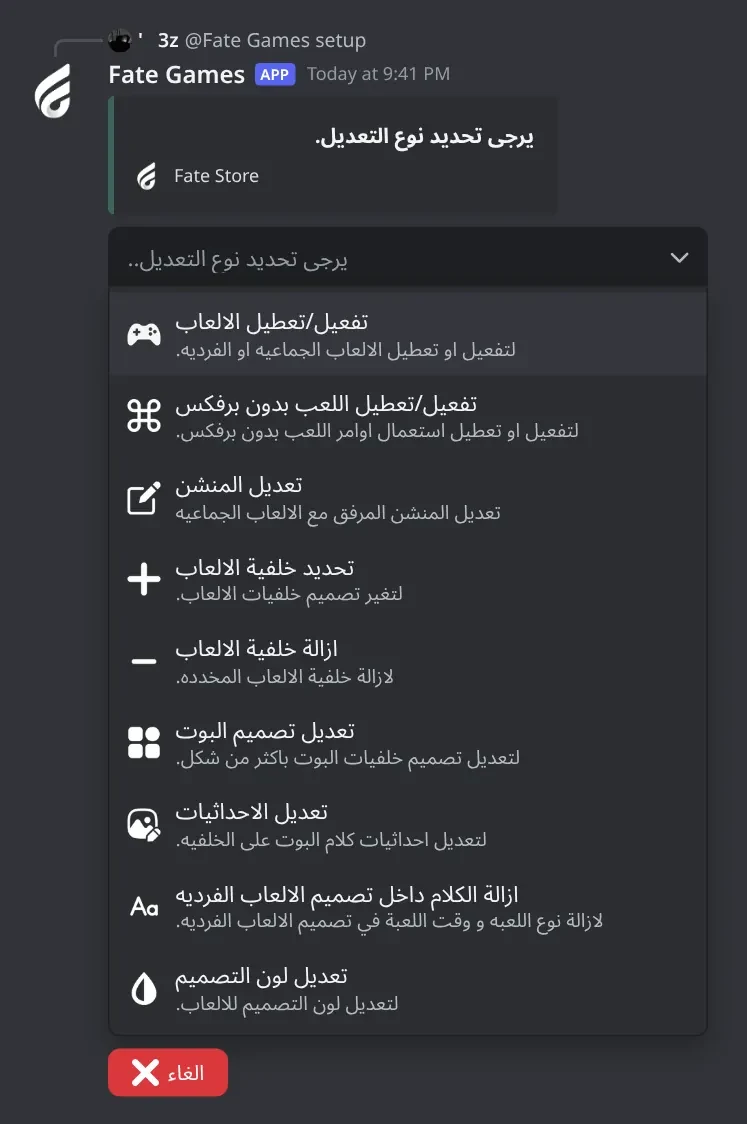
@bot setup > تعديل تصميم البوت switches every image at once: تصميم 1 (Fate Store), تصميم 2 (white) or تصميم 3 (type your colours like #3b615a #5c9083). To change one image use تحديد خلفية الالعاب and attach your picture. Ready-made backgrounds: https://drive.google.com/drive/folders/1Wpo8o2RuBDE0QqWMY0DSWHw0UYcXvYWJ?usp=sharing . Then fix the text position with تعديل الاحداثيات.
8
Tune each team game (optional)
-settings (or @bot setup > اعدادات الالعاب) opens a menu of the team games. For each one you can switch it off, mention @here on start, require voice, rename the buttons, change the join time and switch points off. Roulette has extra tabs for colours, perks and perk prices.
9
Set the points log
@bot setup > تحديد اللوق, then type a staff channel. Every -gp, -rp, -setcoins, -setpoints and member transfer is posted there.
10
Daily use
Members type a game, for example -اسرع (picture game, first right answer wins) or -روليت (team game with a join lobby). Winners get game points, roulette also gives store points, and -نقاطي and -توب show them. Run quick-game events with -ايفنت, let members vote with -تصويت, stop a game with -ايقاف, and give or take points with -setcoins @member +50 / -50 / 50 (or -gp @member 50 and -rp @member 50).
Commands
Examples use the default prefix -. If you changed it, type yours instead.
Who can use a command?
Everyone
Any member. Some commands only work in the channels or rooms the bot is set to.
Owners only
The subscription owner and the extra owners you add (with setowner or from vip). Being the server owner isn't enough.
Managers
The bot's managers list (an owner adds them), and the owners.
Setup12
-prefix
Also works assetprefix
Who can use it: Owners only
Shows the current prefix, or changes it.
Usage
-prefix [new prefix]
Example
-prefix !
Alias -setprefix. With nothing after it the bot replies دالة البوت : -. With a value it replies تم تغير دالة البوت : !. Mentioning the bot always works, whatever the prefix.
-setavatar
Also works assa
Who can use it: Owners only
Changes the bot's avatar.
Usage
-setavatar <image link> (or attach an image)
Example
-setavatar https://example.com/logo.png
Alias -sa. Reacts ✅ when done, or يرجى الانتظار يتم تغير الاقتار بوقت سريع . if Discord refuses (changed too often).
-setbanner
Also works assb
Who can use it: Owners only
Changes the bot's profile banner.
Usage
-setbanner <image link> (or attach an image)
Example
-setbanner https://example.com/banner.png
Alias -sb. Reacts ✅ when done.
-setecolor
Who can use it: Owners only
Sets the colour of the game embeds (game lobbies, lists, cut, duel games).
Usage
-setecolor <#hex | none>
Example
-setecolor #3e635b
Reacts ✅ when saved; none resets it to white (☑️). The colour must start with # (اللون يجب ان يبتدأ في # .). Same as @bot vip > تغير لون الامبيد. Setup and settings panels keep the Fate Store colour.
-setgame
Also works asgame
Who can use it: Owners only
Changes the bot's activity text and type, or its online status.
Usage
-setgame <activity text> | -setgame status
Example
-setgame Nova Lounge
Alias -game. After the text, reply with a number: 1 Playing, 2 Watching, 3 Listening, 4 Streaming, 0 cancel. -setgame status asks for 1 Online, 2 Idle, 3 Dnd, 4 Invisible. You have 60 seconds.
-setname
Also works assn
Who can use it: Owners only
Changes the bot's name.
Usage
-setname <name>
Example
-setname Nova Games
Alias -sn. Reacts ✅ when done. If Discord refuses: يرجى الانتظار يتم تغير الاسم بوقت سريع ، او الاسم غير صالح . (changed too often, or invalid name). Wait about 30 minutes and try again.
-vip
Also works aseditfate
Who can use it: Owners only
Opens the bot settings panel: name, avatar, banner, activity, status, prefix, owners, embed colour, restart. Shows your subscription details.
Usage
-vip
Example
@bot vip
Aliases -edit and -fate. The embed shows the prefix, who the bot is registered to, time left and the subscription number. The panel closes after 4 minutes.
-setup
Also works asاعداد
Who can use it: Owners only
Opens the main settings panel: game switches, backgrounds and design, chats, permissions, points log and points reset.
Usage
-setup
Example
@bot setup
Alias -اعداد. Mention the bot (@bot setup) if you don't know the prefix. Pick an option from the menu; most options answer only to you and wait for a typed answer (60 seconds) or a second menu (15 seconds). The panel stays open for 4 minutes and only the person who opened it can use it. The server owner can open it too.
-setserver
Also works assetguild
Who can use it: Owners only
Moves the bot to another server: it replies with the new invite link and leaves the current server.
Usage
-setserver <server ID>
Example
-setserver 123456789012345678
Alias -setguild. Copy the new server's ID, run this in the current server, then use the link the bot sends to invite it to the new server. The bot leaves any server that isn't the registered one.
Heads up: Double-check the ID before sending. The bot leaves right away and only joins the server you typed.
-ownerlist
Who can use it: Owners only
Lists the owners added in this server.
Usage
-ownerlist
Example
-ownerlist
Shows قائمة الاونرات فارغة . when you haven't added anyone. The subscription owner isn't listed.
-setowner
Also works asowners
Who can use it: Owners only
Adds a member as a bot owner in this server, or removes them if they already are one.
Usage
-setowner <@member | ID>
Example
-owners @Omar
Alias -owners. ✅ means added, ☑️ means removed. Owners can use every command, including setup, settings and points commands.
-restart
Who can use it: Owners only
Restarts the bot.
Usage
-restart
Example
-restart
Reacts 👾 and restarts. Settings and points are kept; any game running is stopped.
Solo games19
-games
Also works asالعاب
Who can use it: Everyone
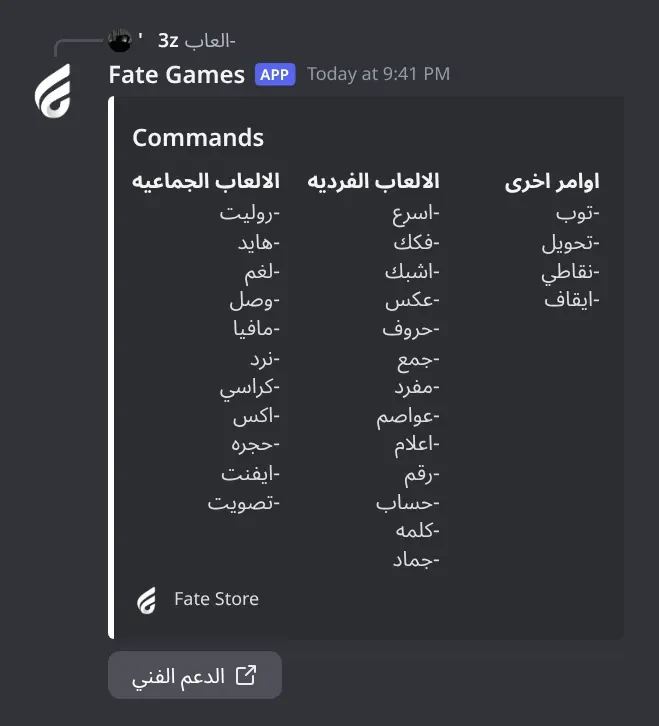
Shows the list of team games, individual games and other commands, with a support button.
Usage
-games
Example
-العاب
Also works as -العاب. This is the command to try in the try channel of the Fate Store server. It counts as an individual game, so the individual-games rules apply: it is ignored while individual games are switched off, outside the allowed chats, or for members without an allowed role.
-فواكه
Who can use it: Everyone
Find the fruit: memorise 8 fruit emojis, then find the one the bot asks for.
Usage
-فواكه
Example
-فواكه
Only the member who started it can play. The emojis show for 5 seconds, then hide; you then have 15 seconds to press the right button. A win gives +1 game point.
-flood
Also works asلون
Who can use it: Everyone
Flood: fill the whole board with one colour by pressing the colour buttons.
Usage
-flood
Example
-لون
Arabic name -لون. Only the member who started it can play. The game ends after 60 seconds without a move. A win gives +1 game point.
-زر
Who can use it: Everyone
Fastest button: 16 grey buttons appear and after 3 seconds one turns green. First to press it wins.
Usage
-زر [@member @member ...]
Example
-زر @Sam @Omar
Mention 2 or more members to let only them play; with no mention (or just one) anyone can play. You have 10 seconds after the button turns green. This game gives no permanent points (it only counts inside an event).
-كت
Who can use it: Everyone
Cut tweet: posts a random conversation question for the chat.
Usage
-كت
Example
-كت
Without a custom cut background it is an embed with the server name and icon and the footer <server> Tweet. With a cut background (setup > تحديد خلفية الالعاب > خلفية الكت) it is an image. No points.
-شعار
Who can use it: Everyone
Logo quiz: shows a brand logo, the first member to type the brand name wins.
Usage
-شعار
Example
-شعار
About 15 seconds to answer. A correct answer gives +1 game point.
-اسرع
Also works asfast
Who can use it: Everyone
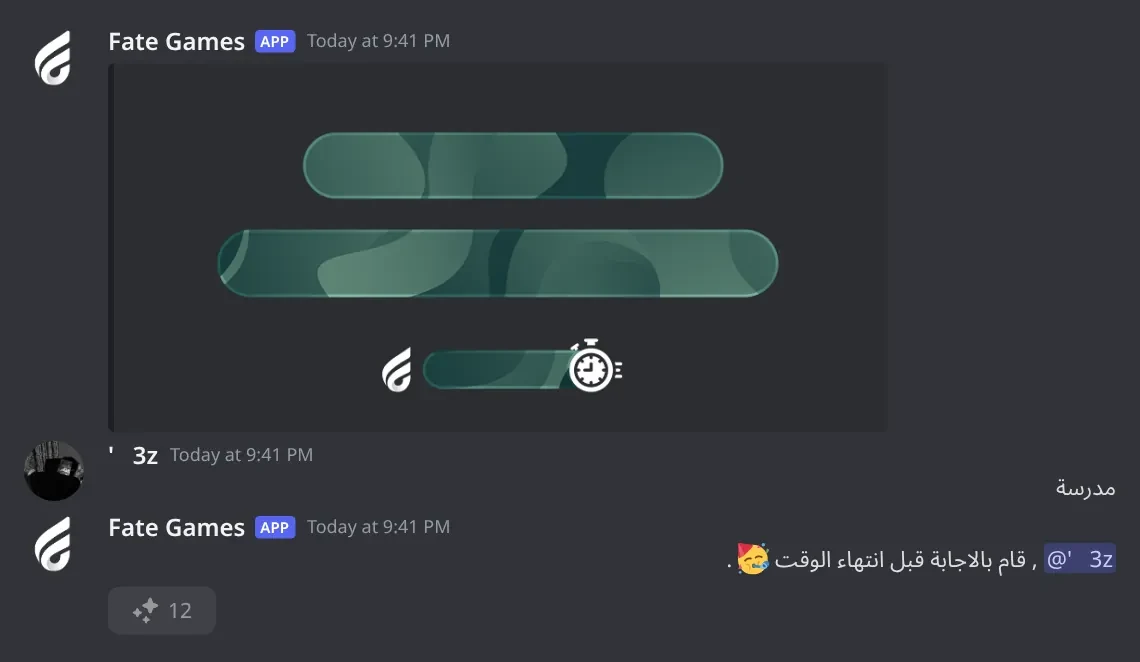
Fastest typer: the bot posts an image with a word and the first member to type it exactly wins.
Usage
-اسرع
Example
-fast
Alias -fast. Everyone in the channel can answer within 15 seconds. The winner gets +1 game point and the bot replies قام بالاجابة قبل انتهاء الوقت 🥳 . with a button showing their total. If nobody answers: لم يتمكن احد من الفوز 🙄 .
Heads up: Only one round of the same picture game runs per server at a time. Starting it again within 15 seconds replies هناك جولة اخرى !.
-اعلام
Also works asعلم
Who can use it: Everyone
Flags: the image shows a flag, type the country name in Arabic.
Usage
-اعلام
Example
-علم
Alias -علم. Uses its own background (the flags background in setup). A few spellings are accepted. 15 seconds, first correct answer wins +1 game point.
-جماد
Who can use it: Everyone
Animal / object / plant / country: type one of the asked type that starts with the shown letter.
Usage
-جماد
Example
-جماد
The image says which type is asked, for example حيوان في : س. Answers are checked with an AI check. 15 seconds, first accepted answer wins +1 game point.
Heads up: The AI check can be slow or reject a right answer now and then.
-جمع
Also works asاجمع
Who can use it: Everyone
Plural: type the plural of the shown word.
Usage
-جمع
Example
-اجمع
Alias -اجمع. The answer must match the bot's word list exactly. 15 seconds, first correct answer wins +1 game point.
-math
Also works asحساب
Who can use it: Everyone
Fastest calculator: solve the addition, subtraction or multiplication shown in the image.
Usage
-math
Example
-حساب
Arabic name -حساب. The first number is 0-999 and the second 0-499, so a subtraction can give a negative result (type it with -). 15 seconds, first correct answer wins +1 game point.
-رقم
Also works asnumber
Who can use it: Everyone
Fastest typer with numbers: type the random number shown in the image.
Usage
-رقم
Example
-number
Alias -number. The number has up to 6 digits. 15 seconds, first correct answer wins +1 game point.
-شبك
Also works asاشبك
Who can use it: Everyone
Join the letters: the image shows separated letters, type them as one word.
Usage
-شبك
Example
-اشبك
Alias -اشبك. 15 seconds, first correct answer wins +1 game point.
-عد
Also works aslettersحروف
Who can use it: Everyone
Count the letters: type how many letters the shown word has.
Usage
-عد
Example
-حروف
Aliases -حروف and -letters. Type the number only. 15 seconds, first correct answer wins +1 game point.
-عكس
Also works asاعكس
Who can use it: Everyone
Reverse the number: the image shows a two-digit number, type it backwards.
Usage
-عكس
Example
-اعكس
Alias -اعكس. Example: 47 becomes 74. 15 seconds, first correct answer wins +1 game point.
-عواصم
Who can use it: Everyone
Capitals: type the capital city of the shown country.
Usage
-عواصم
Example
-عواصم
A few spellings are accepted for each capital. 15 seconds, first correct answer wins +1 game point.
-فكك
Who can use it: Everyone
Split the word: type the shown word with a space between every letter.
Usage
-فكك
Example
-فكك
Example: the image shows بيت, the answer is ب ي ت. 15 seconds, first correct answer wins +1 game point.
-كلمه
Who can use it: Everyone
Word: type any real Arabic word that starts with the two letters shown.
Usage
-كلمه
Example
-كلمه
The bot checks the word against its word list and, if it isn't there, asks an AI check. Accepted new words are added to the list. 15 seconds, first accepted word wins +1 game point.
Heads up: The AI check can be slow or reject a real word now and then.
-مفرد
Who can use it: Everyone
Singular: type the singular of the shown word.
Usage
-مفرد
Example
-مفرد
The answer must match the bot's word list exactly. 15 seconds, first correct answer wins +1 game point.
Duels4
-المارد
Who can use it: Everyone
Akinator in Arabic: think of a character and the genie guesses it from your answers.
Usage
-المارد
Example
-المارد
The bot replies يتم تجهيز اللعبه . then asks questions with answer buttons. Only the member who started it answers. No points.
-connect
Also works asتوصيلconnect4
Who can use it: Everyone
Connect 4 against one member: drop discs and get four in a row.
Usage
-connect <@member>
Example
-توصيل @Sam
Aliases -توصيل and -connect4. The other member gets لقبول اللعب الضغط على الزر with قبول and رفض buttons and has 30 seconds to accept. Then 60 seconds per move. Anyone else pressing the buttons gets وخر يا ملقوف .. No points.
-rock
Also works asحجر
Who can use it: Everyone
Rock paper scissors against one member.
Usage
-rock <@member>
Example
-حجر @Sam
Arabic name -حجر (the team version is -حجره). The other member has 30 seconds to press قبول, then both pick حجرة, ورقة or مقص within 20 seconds. No points.
-uxo
Who can use it: Everyone
Tic-tac-toe (XO) against one member with buttons.
Usage
-uxo <@member>
Example
-uxo @Sam
You play ❌ and the mentioned member ⭕. The game starts right away, no accept step. Each move has 10 seconds or the game ends with ⏳ تم انهاء اللعبه لعدم التفاعل. Pressing out of turn replies ❌ ليس دورك !. No points.
Heads up: Mention someone else: منشن الشخص الى بتلعب معه . means no mention, ما عندك اخويا ؟ means you mentioned yourself.
Game control4
-vcstop
Who can use it: Everyone
Stops the voice-channel game (برا السالفه) in the voice channel you are in.
Usage
-vcstop
Example
-vcstop
Join the game's voice channel first, otherwise: ❌ يجب ان تكون بروم لاستعمال الأمر. Same stop permission as -stop.
-event
Also works asايفنتفعالية
Who can use it: Everyone
Runs a chat event: random rounds of quick games until someone reaches the points you set.
Usage
-event
Example
-ايفنت
Aliases -ايفنت and -فعالية. Pick up to 12 games from the menu within 60 seconds, press عدد النقاط للفوز and type a number, then بدء الايفنت. Each round winner gets an event point (and the normal +1 game point). When someone reaches the target the bot posts ⌛ تم انهاء الجولات . and a top-10 image. Only the starter can use the menu and buttons. Uses the team-games permissions.
Heads up: Stop an event early with -ايقاف. The settings panel closes after 2 minutes if you don't press start.
-stop
Also works asايقافتوقف
Who can use it: Everyone
Stops the game or event running in this channel.
Usage
-stop
Example
-ايقاف
Aliases -ايقاف and -توقف. Replies ⌛ | سيتم ايقاف اللعبه الحاليه ., or 🔴 | لا يوجد فعالية قيد التشغيل . when nothing is running. Who can use it: if nobody was given the ايقاف الالعاب permission, anyone can. Once you add a stop role or member (@bot setup > اضافة/ازالة تصريح استخدام الاوامر > ايقاف الالعاب), only they and Administrators can; others are ignored.
Heads up: It doesn't stop -برا (use -vcstop), and a single picture-game round just runs out on its own.
-تصويت
Who can use it: Everyone
Lets members vote for the next team game; the top game starts by itself after one minute.
Usage
-تصويت
Example
-تصويت
Each member gets one vote. After 1 minute, if the top game has 2 votes or more it starts (⏳ تم التصويت على لعبة ... , سوف تبدأ اللعبة خلال ثواني .); otherwise ❌ لم يتم التصويت على اي لعبة .. Uses the team-games permissions.
Settings8
-chatlist
Who can use it: Managers
Lists the channels allowed for individual and team games.
Usage
-chatlist
Example
-chatlist
Shows يتم استقبال الاوامر من جميع الشاتات when playing in all chats is on, and قائمة الشاتات فارغة . when nothing is set.
-rolelist
Who can use it: Managers
Lists the roles given each permission.
Usage
-rolelist
Example
-rolelist
A games type with no role shows جميع الاعضاء (everyone can play); settings control with no role shows لا احد. Members added one by one are not shown here; see @bot setup > قائمة المصرح له.
-setback
Who can use it: Managers
Changes a game image: attach a picture, then pick which game image it replaces.
Usage
-setback (with an image attached) | -setback none
Example
-setback none
Send the command with the image attached, then pick the type from the menu within 30 seconds (✅ means saved). -setback none and a type puts that image back to default (☑️). The embed links a folder of ready-made backgrounds. The same thing (with a few more types) is in @bot setup > تحديد خلفية الالعاب.
Heads up: Without an attachment it replies يرجى ارفاق الصوره .. Use 2560x1080 images for the individual-games and win backgrounds, or they get stretched.
-setchat
Also works aschat
Who can use it: Managers
Adds or removes a channel where games are allowed, for individual or team games.
Usage
-setchat <#channel | ID>
Example
-setchat #games
Alias -chat. Press العاب فرديه or العاب جماعيه within 15 seconds. Running it again for the same channel and type removes it (تم ازالة الشات .). Adding a channel turns off playing in all chats, so games then only work in the allowed channels.
Heads up: If you add only an individual-games channel, team games stop working everywhere until you add a team-games channel too (or turn all chats back on with -setglobal).
-setgames
Who can use it: Managers
Switches all individual games or all team games on or off.
Usage
-setgames
Example
-setgames
Press العاب فرديه or العاب جماعيه within 15 seconds. ✅ تم تفعيل ... means on, ☑️ تم تعطيل ... means off. While a type is off its commands are ignored with no reply.
-setglobal
Also works asglobal
Who can use it: Managers
Switches "play in all chats" on or off.
Usage
-setglobal
Example
-global
Alias -global. ✅ means games work in every channel again; ☑️ means games only work in the channels added with -setchat.
-setrole
Who can use it: Managers
Adds or removes a role for one permission: settings control, individual games, team games, or stopping games.
Usage
-setrole <@role | ID>
Example
-setrole @Staff
Press التحكم بالاعدادات, العاب فرديه, العاب جماعيه or ايقاف الالعاب within 15 seconds. Running it again removes the role. Once any role is added to a games type, only those roles (and Administrators) can start that type. For points control, or to add a single member, use @bot setup > اضافة/ازالة تصريح استخدام الاوامر.
-settings
Also works asrsettingsاعدادات
Who can use it: Managers
Opens the per-game settings: pick a team game, then change its options (on/off, mention, voice only, buttons, times, points).
Usage
-settings
Example
-اعدادات
Aliases -اعدادات and -rsettings. Same as @bot setup > اعدادات الالعاب. Pick the game within 30 seconds: روليت, مافيا, هايد, نرد, كراسي, بومب, حجرة, اكس او, لغم, وصل. The game's panel stays open 2.5 minutes. Typed values are read from the chat and deleted; numbers must be valid (❌ يرجى كتابة رقم صالح.). Roulette has four tabs: الاعدادات, الالوان, الخصائص and نقاط الخصائص.
Team games11
-اكس
Who can use it: Everyone
XO tournament: random pairs play tic-tac-toe, losers are out, the last one wins.
Usage
-اكس
Example
-اكس
3 to 20 players. 10 seconds per move or you are kicked. A draw kicks both, except in the final where it is replayed. The winner gets +1 game point.
-برا
Who can use it: Everyone
Out of the topic: everyone gets a secret word except one player; ask questions and vote out the outsider.
Usage
-برا
Example
-برا
The starter must be in a voice channel (📌 يجب ان تكون بروم صوتي لبدء اللعبه). The starter picks a topic (جماد, حيوان, ملابس, اكلات), then 3 to 10 players join. Players ask each other, the starter can end questions with 🛑, then everyone votes. The outsider then tries to guess the word from 5 choices. No points.
Heads up: This game is tied to the voice channel, so -ايقاف doesn't stop it. Use -vcstop while you are in that voice channel.
-بومب
Who can use it: Everyone
Word bomb: write a word that starts and ends with the two letters shown before the bomb blows.
Usage
-بومب
Example
-بومب
3 to 20 players, 2 lives each. The bomb holder has 15 seconds. A correct word lets you pass the bomb to someone (or تخطي for random). A wrong or used word, or no answer, costs a life. The last player wins +1 game point.
-حجره
Who can use it: Everyone
Rock-paper-scissors tournament: random pairs, losers are out, the last one wins.
Usage
-حجره
Example
-حجره
4 to 20 players. Each pair has 20 seconds to choose. Not choosing gets you kicked; a draw kicks both except in the final. The winner gets +1 game point.
-روليت
Also works asroulette
Who can use it: Everyone
Roulette: the wheel picks a player, who kicks someone; the last one standing wins.
Usage
-روليت
Example
-roulette
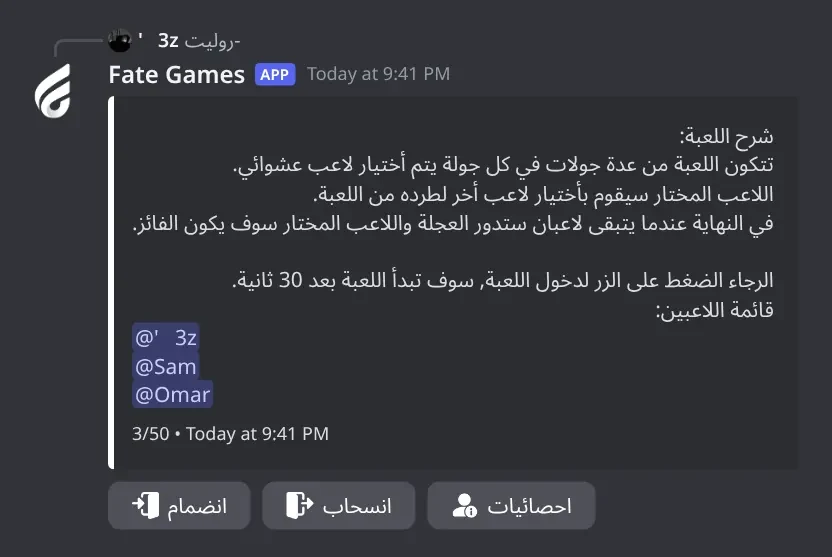
Alias -roulette. 3 to 50 players (the limit is changeable; 25 with join-by-numbers). Players press انضمام during the join time (30 s by default). Each round the picked player has 15 s to press a player's button, عشوائي (random) or انسحاب (leave); if they don't, they are kicked themselves. The winner gets +1 game point and store points (3 by default) and every kick gives 1 store point. Perks, the GIF shop, reverse mode, nuke and the rest are switched on in -settings > روليت.
-كراسي
Who can use it: Everyone
Musical chairs with buttons: grab a seat on blue rounds, don't press on red rounds.
Usage
-كراسي
Example
-كراسي
4 to 20 players. Each round lasts 6 seconds. Blue round 🔵 اضغط الزر في اسرع وقت: there are fewer seats than players and anyone without a seat is out. Red round 🔴 لا تضغط الزر: anyone who presses is out. The last player wins +1 game point.
-لغم
Who can use it: Everyone
Minefield duels: pairs open squares on a 3x3 board, whoever hits the mine is out.
Usage
-لغم
Example
-لغم
3 to 20 players. 10 seconds per move or you are kicked. The last player wins +1 game point.
-مافيا
Also works asmafia
Who can use it: Everyone
Mafia: hidden roles (mafia, doctor, citizens), night kills and day votes.
Usage
-مافيا
Example
-mafia
Alias -mafia. 5 to 15 players. Roles are sent privately: 1 mafia (2 with more than 6 players, 3 with more than 10), 1 doctor, the rest citizens. Each round the mafia vote on a victim (20 s), the doctor protects someone (20 s), then everyone gets 10 s to discuss and 20 s to vote someone out or skip. Citizens win when all mafia are out; mafia win when one non-mafia player is left. No points.
Heads up: A mafia member or doctor who doesn't act in time is removed from the game.
-نرد
Who can use it: Everyone
Team dice: two teams roll dice for 3 rounds; the higher team total wins.
Usage
-نرد
Example
-نرد
2 to 10 players split into two teams. After each roll you have 5 seconds to press العب مرة اخرى (risk it for more) or تخطي. Playing again can also give a card that blocks a player of the other team for the next round. No points.
-هايد
Who can use it: Everyone
Hide and seek: hide behind one of 25 buttons; a random seeker opens one and finds whoever is there.
Usage
-هايد
Example
-هايد
3 to 20 players. Hiding time and pick time are 30 seconds each by default (changeable in -settings > هايد). Players who don't hide are placed at random; a seeker who doesn't pick is kicked. The last player wins +1 game point.
-وصل
Who can use it: Everyone
Connect tournament: random pairs play connect-4 on a 5x5 board, losers are out.
Usage
-وصل
Example
-وصل
3 to 20 players. 15 seconds per turn or you are kicked. A draw kicks both except in the final. The last player wins +1 game point.
Points9
-gp
Who can use it: Managers
Gives store points to a member (shortcut for -setcoins @member +amount).
Usage
-gp <@member | ID> <amount>
Example
-gp @Sam 50
Replies ✅ تم اضافة 50 الى : @member. and posts it in the points log.
-احصائيات
Also works asاحصائياتي
Who can use it: Everyone
Shows roulette stats: kicks made, times kicked, withdrawals, wins and store points.
Usage
-احصائيات [@member | ID]
Example
-احصائياتي
Alias -احصائياتي. The same stats open from the احصائيات button in the roulette lobby.
-points
Also works asنقاطي
Who can use it: Everyone
Shows a points card: individual (game) points, group (team-game wins) and store points.
Usage
-points [@member | ID]
Example
-نقاطي @Sam
Alias -نقاطي. Without a mention it shows your own card. The card colour follows @bot setup > تعديل لون التصميم.
-reset
Also works asتصفير
Who can use it: Managers
Resets points: game points, team-game wins, roulette (store points and stats), or all of them.
Usage
-reset [@member | ID]
Example
-تصفير @Sam
Alias -تصفير. Pick الالعاب الفرديه, الالعاب الجماعيه, الروليت or جميعها within 15 seconds. With a member mentioned that member is reset right away. Without a mention the bot asks هل تود تصفير جميع النقاط ؟ and you press Yes within 15 seconds.
Heads up: A server-wide reset can't be undone.
-rp
Who can use it: Managers
Removes store points from a member (shortcut for -setcoins @member -amount).
Usage
-rp <@member | ID> <amount>
Example
-rp @Sam 50
Replies ☑️ تم ازالة 50 الى : @member. and posts it in the points log. The balance can go below zero.
+50 adds 50 (➕ reaction), -50 removes 50 (➖), 50 sets the balance to exactly 50 (✅). Each change is posted in the points log. Shortcuts: -gp @member 50 and -rp @member 50.
Heads up: You can't set a balance to 0 with this command (0 counts as an invalid number). Use -reset @member instead.
-setpoints
Who can use it: Managers
Adds, removes or sets a member's game points (the points won in games).
Same format as -setcoins: +10 adds, -10 removes, 10 sets. Posted in the points log as نقاط الالعاب.
-top
Also works astoppointsتوبالنقاط
Who can use it: Everyone
Shows the top 5 players as an image, plus your own rank.
Usage
-top
Example
-توب
Aliases -توب, -toppoints and -النقاط. The ranking adds each member's game points and store points together.
-تحويل
Who can use it: Everyone
Sends store points to a member, or converts your game points to store points (10 to 1).
Usage
-تحويل <@member> <amount> | -تحويل <amount>
Example
-تحويل @Sam 5
With a mention it sends store points: ✅ تم تحويل ... نقاط الى @member .. With only a number it converts game points, rounded down: -تحويل 50 gives 5 store points. Below 10: ❌ كل 10 نقاط تسوي نقطة من نقاط المتجر. Every transfer is posted in the points log if one is set.
Heads up: 🤔 لا تمتلك نقاط لتحويلها. means no points of that kind, ⚠️ لا تمتلك عدد النقاط المطلوب. means not enough.
Panels and guides
What each panel and menu does, and how to set it up.
Setup panel
One menu for every bot-wide setting. The first part covers game switches, playing without prefix, the team-game mention, backgrounds, design, text position and colours.
Setup panel · The main settings panel. The first nine options: game switches, playing without prefix, the team-game mention, backgrounds, design, text position and colours.
What's in it
تفعيل/تعطيل الالعاب: switch all individual or all team games.
تفعيل/تعطيل اللعب بدون برفكس: members type روليت or اسرع with no prefix.
تعديل المنشن: what team games mention on start (none = @here).
تحديد خلفية الالعاب / ازالة خلفية الالعاب: change or reset one game image.
تعديل تصميم البوت: change every image at once.
تعديل الاحداثيات: move the text on the picture-game, win and cut images.
ازالة الكلام داخل تصميم الالعاب الفرديه: hide the game name and time on picture-game images.
تعديل لون التصميم: colour of the points card and leaderboards.
تعديل لون الخط (in the second part): colour of the text on picture-game images.
How to set it up
Type @bot setup.
Pick an option. A reply only you can see opens.
Answer it: pick from the small menu within 15 seconds, or type in the chat within 60 seconds.
Pick the next option, or press الغاء when you're done.
Common mistakes
Answering too late. You get ❌ لم يتم التحديد. or an error; pick the option again.
Typing a colour without #. It must look like #3e635b.
Turning on play without prefix in a busy chat: any message that is just a game name starts that game.
Setup panel: chats, permissions and points
The second part of the setup menu: game settings, allowed chats, permissions, the points log and resetting points.
What's in it
اعدادات الالعاب: the per-game settings (same as -settings).
اضافة/ازالة شات مصرح له / اللعب بكل الشاتات / قائمة الشاتات: where games are allowed.
اضافة/ازالة تصريح استخدام الاوامر / قائمة المصرح له: who can control, give points, play and stop games.
تحديد اللوق: the points log channel.
تصفير النقاط: wipe all game points or all store points.
How to set it up
Type @bot setup and scroll down the menu.
Pick the option and follow the reply.
Common mistakes
Using تصفير النقاط to test. It wipes the whole server with no confirmation.
Sending the log channel again. Sending the same channel a second time removes the log (☑️ تم ازالة لوق الالعاب.).
Game backgrounds
Replace any game image with your own picture: the picture-game background, flags, cut, the join image of each team game, in-game backgrounds and the winner image.
What's in it
ايفنت (اسرع فكك..): picture games and event rounds (2560x1080).
خلفية الكت: the cut image (844x379).
دخول ...: the join image that replaces a team game's lobby embed.
الفوز بالالعاب: the team-game winner image (2560x1080).
How to set it up
Type @bot setup and pick تحديد خلفية الالعاب.
Attach the image in the same channel within 60 seconds.
Pick which game image it replaces within 15 seconds.
For picture-game, win or cut images, open تعديل الاحداثيات and place the text.
Common mistakes
Uploading a different size. Picture-game and win images are drawn at 2560x1080 until you save positions in تعديل الاحداثيات.
Picking تعديل تصميم البوت afterwards. Any design replaces the images you uploaded.
Bot design
Change the look of every game image in one step.
What's in it
تصميم 1: Fate Store design.
تصميم 2: white design with black text.
تصميم 3: your colours; type one or more #hex codes separated by spaces.
ازالة التصميم: remove every custom image and colour.
How to set it up
Type @bot setup and pick تعديل تصميم البوت.
Pick a design within 15 seconds.
For تصميم 3, type the colours within 60 seconds.
Common mistakes
Typing colours without # or with 3 digits. Each must be like #5c9083.
Expecting your uploaded backgrounds to stay. A design replaces them.
Text position editor
Move and resize the text on the picture-game image, the winner image and the cut image, with a live preview.
What's in it
Arrows: move 10 pixels.
➕ / ➖: bigger or smaller.
🔄: back to the centre.
✅: save.
نوع اللعبه, مكان الكلمه, الوقت للاجابه: which line of the picture-game image you move.
الافتار, الاسم: the winner's avatar or name on the win image.
How to set it up
Type @bot setup and pick تعديل الاحداثيات.
Pick الالعاب الفرديه, الفوز بالالعاب or الكت.
Pick the line, move it, press ✅. Repeat for each line.
Common mistakes
Uploading a new background after placing the text. A new background resets the positions; place them again.
Allowed chats
Limit games to certain channels, separately for individual and team games.
What's in it
الالعاب الفرديه: allow individual games here.
الالعاب الجماعيه: allow team games, events and votes here.
جميعها: both.
اللعب بكل الشاتات: تفعيل lets games work everywhere again.
How to set it up
Type @bot setup and pick اضافة/ازالة شات مصرح له.
Type the channel mention or ID.
Pick the type within 15 seconds.
Check with قائمة الشاتات.
Common mistakes
Adding a channel for only one type. The other type then stops working everywhere.
Expecting an error in other channels. Games there are ignored with no reply.
Command permissions
Who can control the bot, give points, play each kind of game, and stop games.
What's in it
التحكم بالاعدادات: settings commands and every points command.
التحكم بالنقاط: -gp, -rp, -setcoins, -setpoints, -reset.
الالعاب الفرديه / الالعاب الجماعيه: who can start games (empty = everyone).
ايقاف الالعاب: who can stop games (empty = everyone).
جميعها: both game lists.
How to set it up
Type @bot setup and pick اضافة/ازالة تصريح استخدام الاوامر.
Type a role or member, mention or ID, within 60 seconds.
Pick the permission within 15 seconds. Picking it again removes it.
Check with قائمة المصرح له.
Common mistakes
Thinking Administrators can open -settings. They can't unless they have التحكم بالاعدادات or are owners.
Game settings
Per-game options for the team games: on/off, mention, voice only, leave button, button names, join time and points.
What's in it
اللعبه: switch this game off.
المنشن: mention on start.
داخل الروم: voice members only.
الخروج من اللعبه: hide the leave button.
زر الدخول / زر الخروج: rename the buttons.
وقت البدء: join time in seconds.
حساب نقاط: switch the win point off.
اعادة تعين: reset this game.
How to set it up
Type -settings (or @bot setup > اعدادات الالعاب).
Pick a game within 30 seconds.
Pick an option; toggles change at once, names and times are typed in the chat.
Common mistakes
Typing a time with letters. Only numbers work (❌ يرجى كتابة رقم صالح.).
Looking for picture games here. Only team games have settings.
Roulette settings
Roulette has four tabs: game options, wheel colours, perks and perk prices.
What's in it
الاعدادات: animated wheel, speed, join by numbers, reverse, random kick only, join limit (5-5000), kick time.
الالوان: border, wheel and font colours, ready palettes.
الخصائص: shop and perks.
نقاط الخصائص: store points per win and kick, perk prices.
How to set it up
Type -settings and pick روليت.
Use the four buttons to switch tabs.
Pick an option from the menu of the open tab.
Roulette perks and shop
Perks are special moves members buy with store points: protection, bomb, switch, hack, hide, forbid, snipe, link, reveal, counter-attack, revive and the nuke.
What's in it
المتجر: perk shop, GIF shop and bag buttons in the lobby.
شراء خصائص من داخل اللعبه: buy perks on your turn instead.
One toggle per perk.
How to set it up
Type -settings > روليت > الخصائص.
Switch on المتجر or شراء خصائص من داخل اللعبه.
Switch off any perk you don't want.
Set prices in نقاط الخصائص.
Common mistakes
Turning on perks without the shop or buy-in-game. Nobody can get them.
Reverse roulette on: the shop buttons don't show.
Change a game image with a command
A quick way to replace a game image: send -setback with the picture attached.
What's in it
نوع الصورة: the image to replace.
How to set it up
Send -setback with the image attached.
Pick the type within 30 seconds.
To go back to default send -setback none and pick the type.
Common mistakes
Sending the command without an image (يرجى ارفاق الصوره .).
Bot Settings panel
The bot's name, avatar, banner, activity, status, prefix, owners and embed colour, and your subscription details.
What's in it
اوامر البوت: the command list.
اسم البوت, افتار البوت, بنر البوت, لعب البوت, حالة البوت, برفكس البوت.
اضافة/ازالة اونر: add or remove an owner.
تغير لون الامبيد: colour of the game embeds.
اعادة تشغيل: restart.
How to set it up
Type @bot vip.
Pick an option and answer within 60 seconds.
Common mistakes
Looking for a change-server option here. Use -setserver <server ID>.
Games list for members
-العاب shows members the team games, individual games and points commands.
Games list · The command list members see. Try it in the try channel of the Fate Store server.
What's in it
الدعم الفني: link to Fate Store support.
How to set it up
Tell members to type -العاب in a game channel.
Common mistakes
Running it in a channel that isn't allowed for individual games: it's ignored there.
Picture games
Quick games with an image: fastest typer, split or join letters, count letters, reverse, number, math, plural, singular, capitals, flags, word and animal/object.
Picture game round · Every picture game (اسرع, فكك, اشبك, حروف, اعكس, رقم, حساب, جمع, مفرد, عواصم, اعلام, كلمه, جماد) works the same: an image, 15 seconds, the first right answer wins.
What's in it
Type the answer in the chat within 15 seconds.
The winner gets +1 game point and a button with their total.
How to set it up
Type the game, for example -اسرع.
Change the image in @bot setup > تحديد خلفية الالعاب > ايفنت (اسرع فكك..).
Common mistakes
Answer with extra spaces or another spelling: it doesn't count.
Starting the same game again within 15 seconds (هناك جولة اخرى !).
Team games
Every team game opens a join lobby. When the time is up the game starts if enough players joined.
Team game lobby · Every team game starts with a join lobby like this one (roulette shown). Players press the join button before the time runs out.
What's in it
انضمام / انسحاب: join or leave.
احصائيات: roulette stats.
Roulette with the shop: متجر الخصائص, متجر الصور, الحقيبه.
How to set it up
Type the game, for example -روليت.
Players press انضمام before the countdown ends (30 s by default).
Change the join time, buttons and mention in -settings.
Common mistakes
Too few players: the game is cancelled. Make the join time longer.
Voice-only on and players not in voice (ادخل الرومات اذا بتلعب 🙄 .).
Starting a second game in the same channel (⌛ | هناك لعبة قيد التشغيل).
Events
An event runs random rounds of quick games until a player reaches the points you set, then posts a top-10 image.
What's in it
تحديد اللعبة: pick up to 12 games.
عدد النقاط للفوز: the target.
بدء الايفنت: start.
الغاء: cancel.
How to set it up
Type -ايفنت.
Pick the games within 60 seconds.
Press عدد النقاط للفوز and type a number.
Press بدء الايفنت.
Common mistakes
Pressing start before setting the points (⏳ يرجى تحديد عدد النقاط للبدء .).
Another game is running in the channel: stop it first with -ايقاف.
Game vote
Members vote for a team game for one minute; the top game starts by itself if it has at least 2 votes.
What's in it
The menu: one vote per member.
How to set it up
Type -تصويت.
Members pick a game within 1 minute.
Common mistakes
Only one vote: nothing starts (❌ لم يتم التصويت على اي لعبة .).
Reset points
Reset game points, team-game wins, roulette store points, or all of them, for one member or the whole server.
Every manual points change and every member transfer is posted in the log channel.
What's in it
نقاط المتجر: gp, rp, setcoins.
نقاط الالعاب: setpoints.
تحويل نقاط: member transfers and conversions.
How to set it up
@bot setup > تحديد اللوق and type a staff channel.
Common mistakes
No log set: changes still work, they just aren't posted.
Troubleshooting
Most problems come from channel limits, permission lists or a game that is switched off. The bot ignores those cases without replying.
Typing a game does nothing
How to fix it
Check the game type is on: @bot setup > تفعيل/تعطيل الالعاب, and for team games -settings > the game > اللعبه.
Check the channel: @bot setup > قائمة الشاتات. If chats are listed, games only work there. Turn اللعب بكل الشاتات > تفعيل to allow every channel.
Check the role lists: @bot setup > قائمة المصرح له. If a games type has roles, only those roles and Administrators can start it.
Check the prefix: mention the bot (@bot prefix) to see it.
Team games stopped working after I set a game chat
How to fix it
Adding a chat turns off playing in all chats. Team games then only work in team-game chats.
Add a team-games chat (@bot setup > اضافة/ازالة شات مصرح له > الالعاب الجماعيه or جميعها), or switch اللعب بكل الشاتات > تفعيل.
An admin can't use -settings, -setchat or -setcoins
How to fix it
The Administrator permission doesn't count for these. Give their role التحكم بالاعدادات (or التحكم بالنقاط for points) in @bot setup > اضافة/ازالة تصريح استخدام الاوامر, or add them with -setowner @member.
The Discord server owner can always open @bot setup, which has the same options.
⌛ | هناك لعبة قيد التشغيل
How to fix it
Only one team game, event or vote can run per channel. Wait, or stop it with -ايقاف.
For -برا use -vcstop while in its voice channel.
هناك جولة اخرى !
How to fix it
The same picture game is already running in the server. Wait 15 seconds or play another game.
Who can stop games? Anyone stops them
How to fix it
While nobody has ايقاف الالعاب, anyone can use -ايقاف.
Give a role ايقاف الالعاب in @bot setup > اضافة/ازالة تصريح استخدام الاوامر. Then only that role and Administrators can stop games.
Correct, these games don't give points. Also check حساب نقاط is on for the other team games.
The bot keeps leaving my server
How to fix it
It only stays in the server registered to your subscription. Invite it to that server, or move it with -setserver <server ID> from the registered server.
Get the invite link from the subscriptions control channel in the Fate Store server.
-help does nothing
How to fix it
The command list is -العاب, or @bot vip > اوامر البوت for the full list.