All bot docs

Streak bot

Members keep a daily streak by posting a picture every day.

Getting started

Set up the Streak bot in a few minutes. Members keep a daily streak 🔥 by posting an image in one channel; the bot counts the days, reminds them before the streak ends and shows a top list.

  1. Invite the bot to the right server

    Invite the bot to the server your subscription is for. Get the invite link from the subscriptions control channel in the Fate Store server: press تعديل, then ارسال الروابط. The bot only works in that server and leaves any other server right away.

  2. Give the bot a role with the right permissions

    In the streak channel and wherever you use commands, the bot needs View Channels, Send Messages, Embed Links, Read Message History, Add Reactions and Manage Messages (it deletes the answers you type in the settings menu). It doesn't give roles, so its role position doesn't matter. Administrator is the easy way.

  3. Know the prefix

    The default prefix is !, for example !top. Mentioning the bot also works, for example @bot setup. The Rank bot also uses ! and also has !top, so if you have both, change one prefix with !prefix or from @bot vip.

  4. Know who the owners are

    Owners are the subscription owner and the extra owners you add with !setowner @member. Only owners can use !setup, !setpoints and @bot vip. For anyone else these commands do nothing and show no error.

  5. Set the streak channel

    Type @bot setup, pick شات الستريك, then mention the channel, like #streak, within 60 seconds. Nothing is counted until you set it. The system itself is on by default (تفعيل/تعطيل النظام).

  6. Adjust the extras (optional)

    In the same menu: ايموجي الستريك changes the reaction (default 🔥), تفعيل/تعطيل اضافة ايموجي turns the reaction off, and the three لون الامبيد options change the message colours. Streak messages go to members' DMs by default. To send them in the streak channel instead, turn on تفعيل/تعطيل ارسال تطوير الستريك بالشات.

  7. How members keep a streak

    A member posts a message with an image (any attached file counts) in the streak channel. The first one starts the streak at 1. After that the streak goes up by 1 at most once every 24 hours, counted from the last increase. If 24 hours pass with no image, the streak goes back to 0. The bot DMs a reminder between 21 and 24 hours after the last image. Tell members to post at least once a day and keep their DMs open.

  8. Daily use

    Members check their streak with !points and the leaders with !top. Owners can set a member's streak with !setpoints @member <number>, block members or roles with منع من الستريك, and wipe everyone's streak with اعادة تعين الستريك in @bot setup.

Commands

Examples use the default prefix !. If you changed it, type yours instead.

Who can use a command?

Everyone
Any member. Some commands only work in the channels or rooms the bot is set to.
Owners only
The subscription owner and the extra owners you add (with setowner or from vip). Being the server owner isn't enough.

Setup2

  • !setup

    Also works assettingssetting
    Who can use it: Owners only

    Opens the streak settings menu: streak channel, emoji, on/off switches, embed colours, block list and reset.

    Usage
    !setup
    Example
    @bot setup

    Also works as settings or setting. Mention the bot (@bot setup) if you don't know the prefix. Pick an option; options that need an answer ask you to type it in the same channel within 60 seconds, and your answer is deleted. The menu stays open for 4 minutes and only the person who opened it can use it. Replies are shown only to you.

    Heads up: اعادة تعين الستريك wipes every member's streak right away, with no confirmation.
  • !setpoints

    Also works assetstreakspoints
    Who can use it: Owners only

    Sets a member's streak to the number you choose.

    Usage
    !setpoints <@member | ID> <number>
    Example
    !setpoints @Sam 10

    Also works as setstreak or spoints. The bot replies تم تحديث نقاط @Sam الى 10 🔥.. Without a member you get يرجى ارفاق منشن العضو او الايدي., and without a number يرجى ارفاق عدد نقاط صحيح..

Bot settings10

  • !prefix

    Also works assetprefix
    Who can use it: Owners only

    Changes the bot's prefix, or shows the current one if you type nothing.

    Usage
    !prefix [new prefix]
    Example
    !prefix s!

    Also works as setprefix. Mentioning the bot always works as a prefix, so @bot prefix shows the current one.

  • !setavatar

    Also works assa
    Who can use it: Owners only

    Changes the bot's avatar.

    Usage
    !setavatar <image link | attachment>
    Example
    !setavatar https://example.com/logo.png

    Also works as sa. Attach an image or paste a link.

  • !setbanner

    Also works assb
    Who can use it: Owners only

    Changes the bot's profile banner.

    Usage
    !setbanner <image link | attachment>
    Example
    !setbanner https://example.com/banner.png

    Also works as sb. Attach an image or paste a link.

  • !setgame

    Also works asgame
    Who can use it: Owners only

    Changes the bot's activity text and type, or its online status.

    Usage
    !setgame <text | status>
    Example
    !setgame Nova Lounge

    Also works as game. Type the text, then reply with a number within 60 s: 1 Playing, 2 Watching, 3 Listening, 4 Streaming, 0 cancel. Type !setgame status to pick 1 Online, 2 Idle, 3 Dnd or 4 Invisible.

  • !setname

    Also works assn
    Who can use it: Owners only

    Changes the bot's username.

    Usage
    !setname <name>
    Example
    !setname Nova Streak

    Also works as sn. Discord limits name changes; if you change it too often you get يرجى الانتظار يتم تغير الاسم بوقت سريع ، او الاسم غير صالح .

  • !vip

    Also works aseditfate
    Who can use it: Owners only

    Opens the Bot Settings panel to change the bot's name, avatar, banner, activity, status, prefix and owners, or restart it.

    Usage
    !vip
    Example
    @bot vip

    Also works as !edit or !fate. Mention the bot (@bot vip) if you don't know the prefix. The panel shows the prefix, who the bot is registered to, when the subscription ends and the subscription number. Pick an option, then type or attach your answer in the same channel within 60 seconds. The panel stays open for 4 minutes and only the person who opened it can use it.

  • !setserver

    Also works assetguild
    Who can use it: Owners only

    Moves the bot to another server.

    Usage
    !setserver <server ID>
    Example
    !setserver 123456789012345678

    Also works as setguild. The bot replies with an invite link for the new server and leaves the current one right away. Invite it to the new server with that link.

    Heads up: The bot leaves this server immediately. Settings and streaks are tied to the old server.

  • !ownerlist

    Who can use it: Owners only

    Lists the extra owners added to the bot.

    Usage
    !ownerlist
    Example
    !ownerlist

    Empty: قائمة الاونرات فارغة.

  • !setowner

    Also works asowners
    Who can use it: Owners only

    Adds an extra bot owner, or removes them if they already are one.

    Usage
    !setowner <@member | ID>
    Example
    !setowner @Omar

    Also works as owners. Owners can use every command. The bot reacts ✅ when added and ☑️ when removed.

  • !restart

    Who can use it: Owners only

    Restarts the bot.

    Usage
    !restart
    Example
    !restart

    The bot reacts 👾 and comes back in a few seconds. Settings and streaks are kept.

Members2

  • !points

    Who can use it: Everyone

    Shows your current streak, or another member's if you mention them.

    Usage
    !points [@member]
    Example
    !points @Sam

    The bot replies with the number of days, for example 🔥 7.. A member who never posted, or whose streak ended, shows 🔥 0.. Only a mention works here, not an ID.

    Heads up: Members (or members with a role) on the streak block list get no reply at all.

  • !top

    Who can use it: Everyone

    Shows the top 10 members with the highest streak in the server.

    Usage
    !top
    Example
    !top

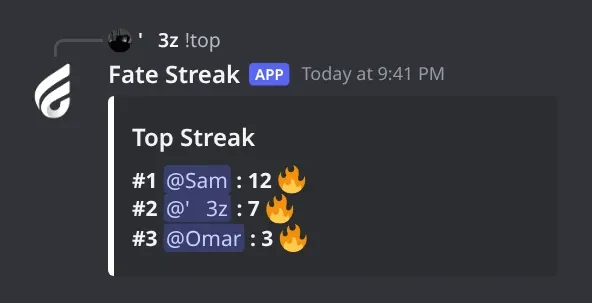
    The list is titled Top Streak and each line looks like #1 @Sam: 12 🔥. Members whose streak ended can still show with 0 🔥 until others pass them.

    Heads up: If you also have the Rank bot with the same prefix !, both bots answer !top. Change one bot's prefix.

Panels and guides

What each panel and menu does, and how to set it up.

Streak settings

The streak channel, the reaction emoji, on/off switches, message colours, the block list and the reset, all in one menu.

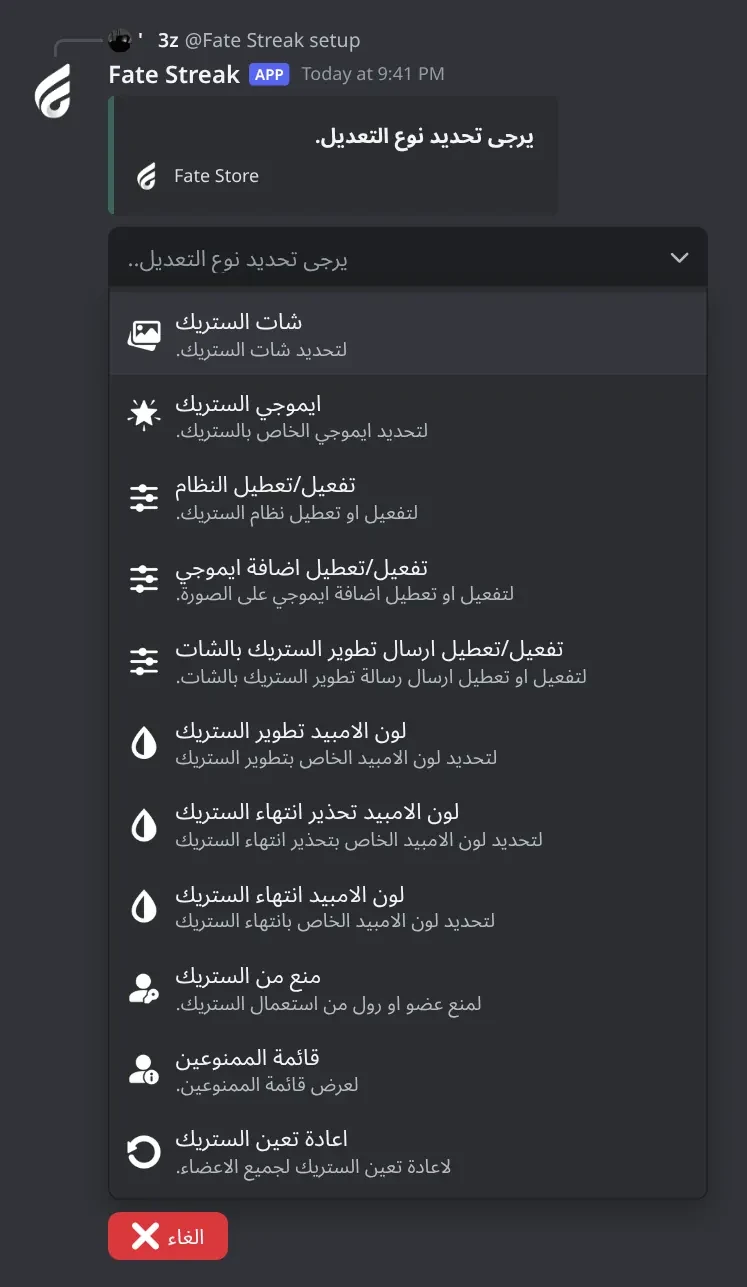
Streak settings menu. Every streak setting: the streak channel, the reaction emoji, on/off switches, message colours, the block list and the reset.
Streak settings menu · Every streak setting: the streak channel, the reaction emoji, on/off switches, message colours, the block list and the reset.

What's in it

  • شات الستريك: the one channel where images count.
  • ايموجي الستريك and تفعيل/تعطيل اضافة ايموجي: the reaction on each image.
  • تفعيل/تعطيل النظام: the whole system on/off (on by default).
  • تفعيل/تعطيل ارسال تطوير الستريك بالشات: new-streak and streak-up messages in the channel instead of DMs.
  • لون الامبيد تطوير الستريك, لون الامبيد تحذير انتهاء الستريك, لون الامبيد انتهاء الستريك: message colours, or none for the default.
  • منع من الستريك and قائمة الممنوعين: members and roles that can't take part.
  • اعادة تعين الستريك: deletes every member's streak.

How to set it up

  1. Type @bot setup (or !setup).
  2. Pick an option.
  3. If it asks, type the channel, emoji, colour, member or role in the same channel within 60 seconds. Your message is deleted.
  4. Read the reply (only you see it), then pick the next option. Send the same channel again to remove it.

Common mistakes

  • Not setting the streak channel. Nothing is counted without it.
  • Typing a colour like #fff or red. Use a full code like #00ff00.
  • Picking اعادة تعين الستريك to test it. It wipes everyone's streak at once, with no confirmation.

Block list

Members and roles on this list can't keep a streak, and !points / !top ignore them.

What's in it

  • منع من الستريك: add a member or role (mention or ID), or send one that's already blocked to unblock them.
  • قائمة الممنوعين: show the list, only to you.

How to set it up

  1. Type @bot setup and pick منع من الستريك.
  2. Mention the member or role within 60 seconds.
  3. You get ✅ تم اضافة ... الى قائمة الغير مصرح لهم.
  4. Check the list with قائمة الممنوعين.

Streak messages

The four automatic messages members get: new streak, streak up, the warning before it ends, and the end.

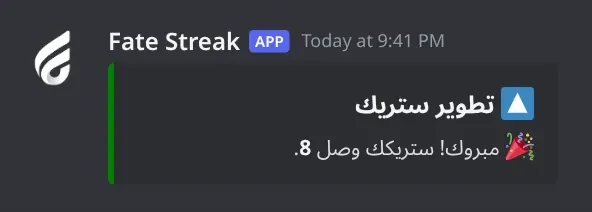
Streak up message. Sent when a member's streak goes up by one day. It goes to their DMs, or as a reply in the streak channel if `تفعيل/تعطيل ارسال تطوير الستريك بالشات` is on.
Streak up message · Sent when a member's streak goes up by one day. It goes to their DMs, or as a reply in the streak channel if تفعيل/تعطيل ارسال تطوير الستريك بالشات is on.

What's in it

  • 🎉 بدأت ستريك جديد: first image, or first image after a streak ended.
  • 🔼 تطوير ستريك: the streak went up by one day.
  • ⏳ تنبيه ستريك: DM 21 to 24 hours after the last image.
  • 👋 انتهى ستريكك: DM when the streak goes back to 0.

How to set it up

  1. New-streak and streak-up messages go to DMs, or to the streak channel if تفعيل/تعطيل ارسال تطوير الستريك بالشات is on.
  2. Warning and end messages are always DMs.
  3. Change their colours with the three لون الامبيد options in @bot setup.

Common mistakes

  • Members with closed DMs miss the messages; their streak still counts.

Streak points

!points shows a member's current streak in days.

What's in it

  • !points: your own streak.
  • !points @member: another member's streak.

How to set it up

  1. Type !points in any channel the bot can see.
  2. The bot replies with the number, like 🔥 7..

Common mistakes

  • Using an ID instead of a mention. Only mentions work.
  • Blocked members get no reply.

Top Streak

!top shows the 10 members with the highest streak.

Top Streak. The 10 members with the highest streak.
Top Streak · The 10 members with the highest streak.

What's in it

  • !top: the top 10 list.

How to set it up

  1. Type !top.
  2. The bot replies with the Top Streak list.

Common mistakes

  • Having the Rank bot with the same prefix. Both answer !top; change one prefix.
  • Expecting ended streaks to disappear. They show as 0 🔥 until others pass them.

Bot Settings panel

Change the bot's name, avatar, banner, activity, status, prefix and owners, or restart it. It also shows your subscription details.

What's in it

  • اوامر البوت: short command list.
  • اسم البوت, افتار البوت, بنر البوت: name and images.
  • لعب البوت, حالة البوت: activity and status.
  • برفكس البوت: prefix.
  • اضافة/ازالة اونر: owners.
  • ازالة افتار البوت, ازالة بنر البوت, اعادة تشغيل.

How to set it up

  1. Mention the bot and type vip: @bot vip.
  2. Pick an option.
  3. Type or attach your answer in the same channel within 60 seconds.

Common mistakes

  • Changing the name too often. Discord makes you wait about half an hour.

Troubleshooting

Common problems and how to fix them.

The bot doesn't respond to any command

How to fix it

  • Use the prefix ! or mention the bot, for example @bot setup.
  • Make sure the bot can see the channel and send messages in it.
  • Owner commands do nothing for non-owners and show no error.
  • If the Rank bot answers instead, give one of them another prefix.

Images don't count and get no reaction

How to fix it

  • Set the streak channel in @bot setup > شات الستريك, and post in that channel.
  • Check تفعيل/تعطيل النظام is on.
  • The message needs an attached file. Text and links alone don't count.
  • Blocked members and members with a blocked role are ignored (قائمة الممنوعين).

Images count but there's no reaction

How to fix it

  • Check تفعيل/تعطيل اضافة ايموجي is on.
  • Give the bot Add Reactions in the streak channel.
  • If you set a custom emoji, it must be from your server. Set 🔥 again with ايموجي الستريك to test.

A member posted but their streak didn't go up

How to fix it

  • The streak goes up at most once every 24 hours, counted from the last time it went up, not at midnight.
  • Images in between only get the reaction. The member just needs to keep posting at least once every 24 hours.

A member's streak went back to 0

How to fix it

  • More than 24 hours passed since their last image. The bot DMs a warning between 21 and 24 hours, if their DMs are open.
  • Images posted while the bot was offline or restarting aren't counted.
  • To give it back, use !setpoints @member <number>.

Members don't get the streak messages

How to fix it

  • They're DMs by default. Members need DMs from server members open.
  • To send new-streak and streak-up messages in the streak channel, turn on تفعيل/تعطيل ارسال تطوير الستريك بالشات. Warnings and end messages are always DMs.
  • If you changed a لون الامبيد colour, make sure it's a full code like #00ff00, or type none to go back to the default.

The bot left my server right after I invited it

How to fix it

  • It only works in the server registered to your subscription. Invite it with the link from the subscriptions control channel in the Fate Store server.
  • To move it, use !setserver <server ID> in the current server.