All bot docs

Top Voice bot

A live ranking of the busiest voice servers, plus a panel to find people in voice.

Getting started

Set up the Top Voice bot in a few minutes. It posts a live ranking of the servers with the most real members in voice, and a search panel your members use to find people in voice rooms.

  1. Invite the bot to the right server

    Invite the bot to the server your subscription is for. Get the invite link from the subscriptions control channel in the Fate Store server: press تعديل, then ارسال الروابط. The bot only works in that server and leaves any other server right away.

  2. Give the bot a role with the right permissions

    The bot needs View Channels, Send Messages, Embed Links, Attach Files, Read Message History, Add Reactions and Manage Messages in the Top Voice and search channels (it clears the search channel before posting the panel). Administrator is the easy way. The buttons work for everyone who can see the channel.

  3. Know the prefix

    The default prefix is ., for example .setup. Mentioning the bot also works, for example @bot vip. Change it with .prefix or from @bot vip > برفكس البوت.

  4. Know who the owners are

    Owners are the subscription owner and the extra owners you add with .setowner @member. Every command of this bot is for owners only. For anyone else the commands do nothing and show no error. Members only use the buttons.

  5. Post the Top Voice message

    Make a channel for it, go inside it and type .setup. The bot posts the Top Voice image with a بحث button and edits it every 60 seconds.

  6. Pick a background (optional)

    Type .setback and attach an image, 1436×977 works best. It shows on the next update. .setback none puts the default background back.

  7. Post the search panel

    Make an empty channel and type .stalking #channel <description>, and/or attach an image. The bot clears that channel and posts the panel with بحث, تتبع and السيرفرات المشتركه.

  8. Get your server listed

    The ranking and the search only cover servers that Fate Store added to its system. To have your server show in Top Voice or be searchable, open a ticket in the Fate Store server. A server needs at least 10 real members in voice to show, and only the top 6 are shown.

  9. Daily use

    Nothing to do: the Top Voice message updates by itself. Members press بحث on it to check any listed server by ID, and use the search panel to find someone in voice, track them for an hour in DMs, or see their mutual servers. You can check a server yourself with .check <server ID>.

Commands

Examples use the default prefix .. If you changed it, type yours instead.

Who can use a command?

Owners only
The subscription owner and the extra owners you add (with setowner or from vip). Being the server owner isn't enough.

Setup3

  • .setback

    Who can use it: Owners only

    Sets your own background for the Top Voice image, or puts the default one back.

    Usage
    .setback  (attach an image) | .setback none
    Example
    .setback none

    Attach the image to the command. The image is stretched to 1436×977, so use that size. The bot reacts ✅ and the new background shows on the next update (within a minute). .setback none removes it (☑). Without an image you get يرجى ارفاق الصورة ., and if the upload fails خطأ في تحميل الصورة .

    Heads up: The text is drawn at fixed spots, so keep the left and middle of the image plain enough to read the server names and numbers.
  • .setup

    Who can use it: Owners only

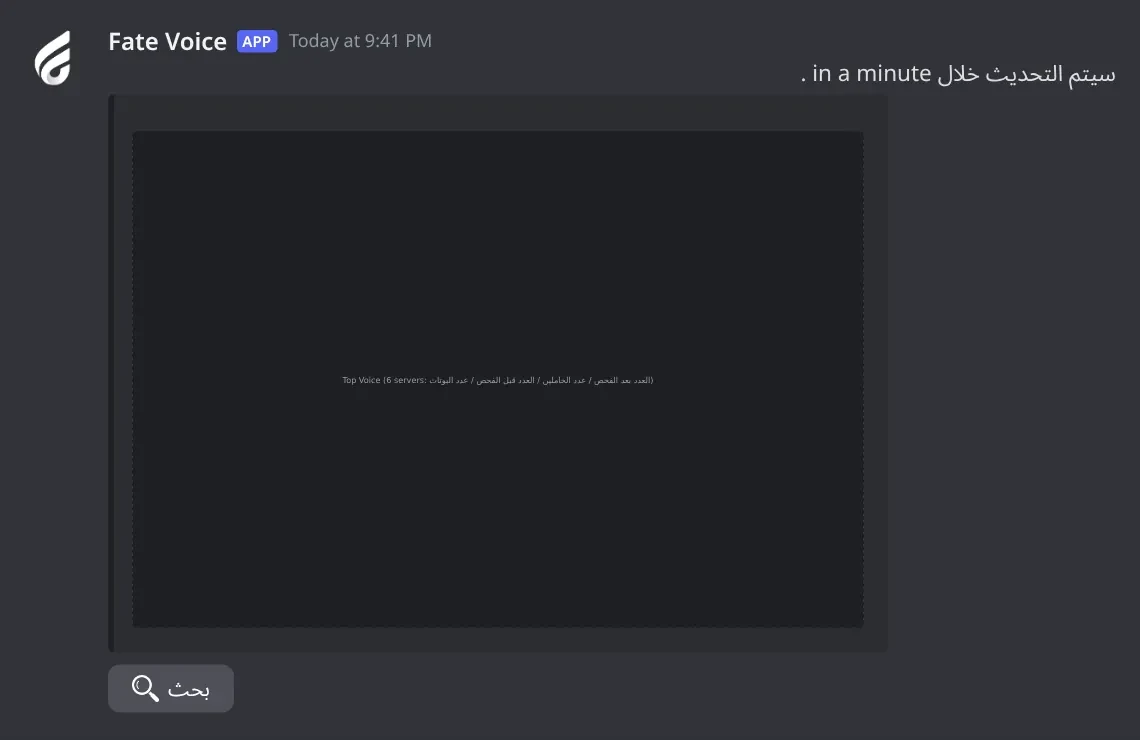
    Posts the Top Voice message in the channel where you type it. The bot updates it every 60 seconds.

    Usage
    .setup
    Example
    .setup

    Type it inside the channel you want. The bot reacts ✅, posts Fate Voice Loading .. with a بحث button, then replaces it with the Top Voice image and سيتم التحديث خلال <time> . Members use the بحث button to look up any monitored server by its ID. Running .setup again posts a new message and the old one stops updating. In an announcement channel the bot deletes the channel's recent messages, posts a new message and publishes it on every update.

    Heads up: In an announcement channel every message in it is deleted each minute, so use a channel only for Top Voice.

  • .stalking

    Who can use it: Owners only

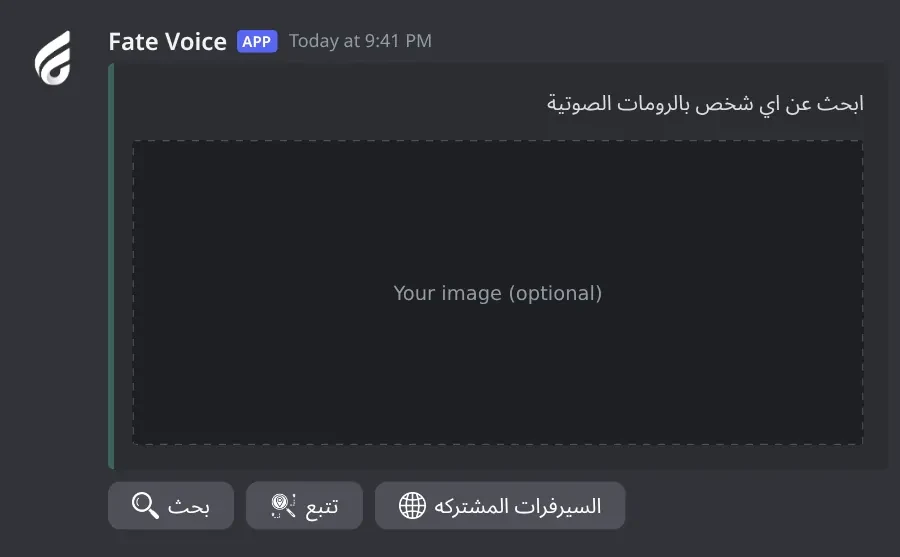
    Posts the search panel with the بحث, تتبع and السيرفرات المشتركه buttons in a channel.

    Usage
    .stalking <#channel | channel ID | channel name> [description]  (and/or attach an image)
    Example
    .stalking #search ابحث عن اي شخص بالرومات الصوتية

    Give a description, an attached image, or both. The description goes in an embed and the image is sent with it. Without a channel the bot shows how to use the command. Without a description or image you get يرجى ارفاق الصورة او الوصف مع الامر . The bot reacts ✅ when done. Any member can use the buttons.

    Heads up: The bot first deletes up to 100 recent messages in that channel. Use an empty channel made for the panel.

Settings11

  • .help

    Also works asاوامر
    Who can use it: Owners only

    Lists the main commands with your current prefix.

    Usage
    .help
    Example
    .help

    Also works as .اوامر. The same list opens from @bot vip > اوامر البوت.

  • .prefix

    Also works assetprefix
    Who can use it: Owners only

    Shows or changes the bot prefix.

    Usage
    .prefix [new prefix | NONE]
    Example
    .prefix !

    Also works as .setprefix. Without a value it shows the current prefix. NONE or اوامر puts the default . back. Mentioning the bot always works as a prefix, for example @bot prefix .. You can also change it from @bot vip > برفكس البوت.

  • .setavatar

    Also works assa
    Who can use it: Owners only

    Changes the bot's profile picture.

    Usage
    .setavatar <image link>  (or attach an image)
    Example
    .setavatar https://example.com/avatar.png

    Also works as .sa. Paste a link or attach the image to the command. The bot reacts ✅ when done. If you change it too often you get يرجى الانتظار يتم تغير الاقتار بوقت سريع .

  • .setbanner

    Also works assb
    Who can use it: Owners only

    Changes the bot's profile banner.

    Usage
    .setbanner <image link>  (or attach an image)
    Example
    .setbanner https://example.com/banner.png

    Also works as .sb. Paste a link or attach the image to the command. The bot reacts ✅ when done.

  • .setgame

    Also works asgame
    Who can use it: Owners only

    Changes the bot's activity text, or its online status.

    Usage
    .setgame <text> | .setgame status
    Example
    .setgame Nova Lounge

    Also works as .game. With text, the bot asks you to type a number: 1 Playing, 2 Watching, 3 Listening, 4 Streaming, 0 Cancel. With status, the numbers are 1 Online, 2 Idle, 3 Dnd, 4 Invisible, 0 Cancel. Arabic digits work too. You have 60 seconds to answer.

  • .setname

    Also works assn
    Who can use it: Owners only

    Changes the bot's username.

    Usage
    .setname <name>
    Example
    .setname Nova Voice

    Also works as .sn. The name must be 2 to 32 characters. The bot reacts ✅ when done. If it fails you get يرجى الانتظار يتم تغير الاسم بوقت سريع ، او الاسم غير صالح .

    Heads up: Discord limits how often a bot can change its name. If it fails, wait about 30 minutes or try another name.

  • .vip

    Also works aseditfate
    Who can use it: Owners only

    Opens the Bot Settings panel to change the bot's name, avatar, banner, activity, status, prefix and owners, or restart it.

    Usage
    .vip
    Example
    @bot vip

    Also works as .edit and .fate. Mention the bot (@bot vip) if you don't know the prefix. The panel shows the prefix, who the bot is registered to, when the subscription ends and the subscription number. Pick an option, then type or attach your answer in the same channel within 60 seconds. The panel stays open for 4 minutes and only the person who opened it can use it.

  • .setserver

    Also works assetguild
    Who can use it: Owners only

    Moves the bot to another server.

    Usage
    .setserver <server ID>
    Example
    .setserver 123456789012345678

    Also works as .setguild. The bot replies with an invite link for the new server, then leaves the current one. Use that link to add it to the new server. You can also change the server from the subscriptions control channel in the Fate Store server: press تعديل, then تغير السيرفر. The Top Voice @bot vip panel has no server option.

    Heads up: The bot leaves your server right away. The Top Voice channel, search panel and background are saved per server, so run .setup and .stalking again in the new server.

  • .ownerlist

    Who can use it: Owners only

    Lists the extra owners you added.

    Usage
    .ownerlist
    Example
    .ownerlist

    The subscription owner is not shown here. If you haven't added anyone you get قائمة الاونرات فارغة.

  • .setowner

    Also works asowners
    Who can use it: Owners only

    Adds or removes an extra bot owner.

    Usage
    .setowner <@member | ID>
    Example
    .setowner @Omar

    Also works as .owners. Owners can use every command, including .setup, .stalking and @bot vip. Run it again on the same member to remove them. The bot reacts ✅ when added and ☑️ when removed.

    Heads up: Owners can move the bot to another server and restart it. Only add people you trust.

  • .restart

    Who can use it: Owners only

    Restarts the bot.

    Usage
    .restart
    Example
    .restart

    The bot reacts 👾 and comes back after a few seconds. Your settings are kept and the Top Voice message keeps updating.

    Heads up: Everyone being tracked with تتبع is dropped. Members have to start tracking again.

Voice2

  • .check

    Who can use it: Owners only

    Shows the voice numbers of one monitored server.

    Usage
    .check <server ID>
    Example
    .check 123456789012345678

    The reply shows السيرفر (name), الفويس (everyone in voice), البوتات (bots), الوهمي (idle or fake accounts) and بعد الفحص (real members after the check). Without an ID you get يرجى ارفاق ايدي السيرفر. If the server isn't in the Top Voice system you get السيرفر غير مضاف. Members get the same numbers from the بحث button on the Top Voice message.

  • .voice

    Who can use it: Owners only

    Sends the current Top Voice image once, in this channel.

    Usage
    .voice
    Example
    .voice

    The bot posts يتم تجهيز الفويس.. and replaces it with the image. This copy doesn't update by itself.

Panels and guides

What each panel and menu does, and how to set it up.

Top Voice message

A live image of the 6 servers with the most real members in voice, updated every 60 seconds, with a بحث button to check any listed server.

Top Voice message. The leaderboard image of the 6 servers with the most real members in voice. The bot edits it every 60 seconds.
Top Voice message · The leaderboard image of the 6 servers with the most real members in voice. The bot edits it every 60 seconds.

What's in it

  • بحث: asks for a server ID and shows its voice numbers to that member only.

How to set it up

  1. Go into the channel you want and type .setup.
  2. Optional: .setback with an image (1436×977) for your own background, .setback none to remove it.
  3. To post a one-time copy anywhere, use .voice.

Common mistakes

  • Using an announcement channel for other things: the bot deletes the channel's messages on every update.
  • Expecting every server: only servers added by Fate Store with 10 or more real members in voice show, top 6 only.

Search panel

The panel members use to find someone in voice, track them, or see their mutual servers.

Search panel. The panel members use to find someone in voice, track them for an hour, or see their mutual servers.
Search panel · The panel members use to find someone in voice, track them for an hour, or see their mutual servers.

What's in it

  • بحث: finds the voice room a person is in right now.
  • تتبع: DMs you every time that person joins, leaves or changes room, for 1 hour.
  • السيرفرات المشتركه: how many searched servers that person is in.

How to set it up

  1. Make an empty channel.
  2. Type .stalking #channel <description> and/or attach an image.
  3. Check the bot can send messages, embeds and files there.

Common mistakes

  • Running it in a channel with chat history: up to 100 recent messages are deleted.
  • Forgetting both the description and the image: you get يرجى ارفاق الصورة او الوصف مع الامر .

Search result

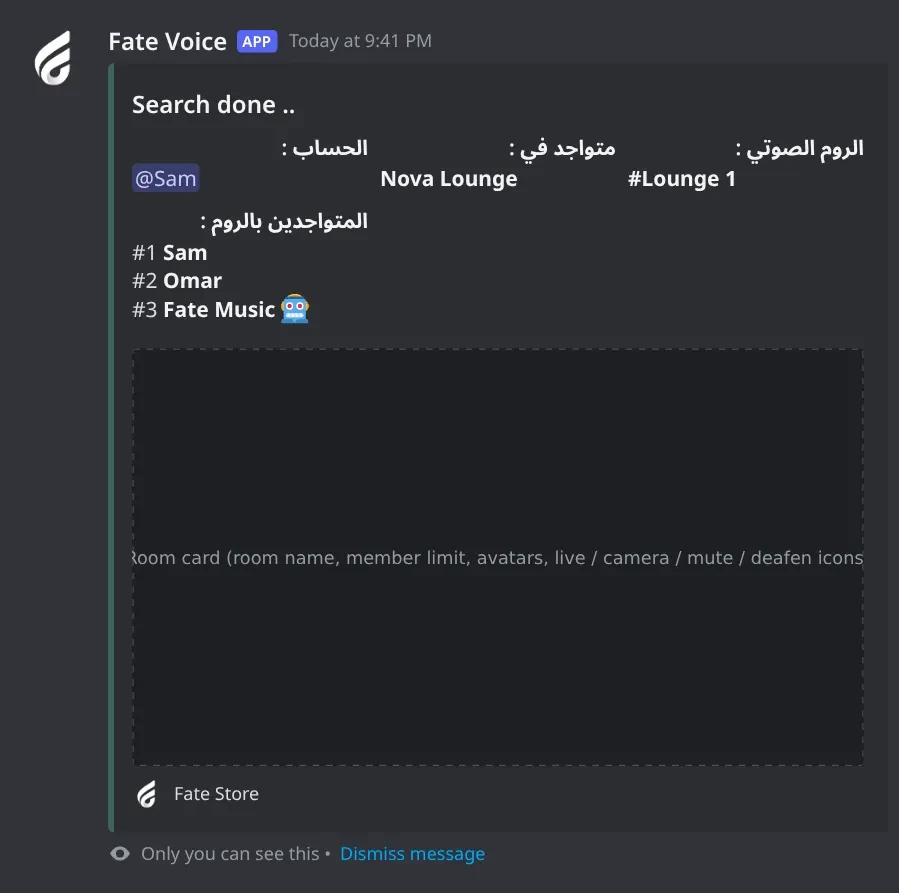
Shows the server, the voice room, who is in it, and a picture of the room with live, camera, mute and deafen icons.

Search result. Where the person is in voice right now: the server, the room and who is with them, with a picture of the room.
Search result · Where the person is in voice right now: the server, the room and who is with them, with a picture of the room.

What's in it

  • Account ID: the person's Discord user ID.

How to set it up

  1. Nothing to set up. It comes with .stalking.

Common mistakes

  • Typing a name or mention instead of the ID.
  • The person is in voice in a server that isn't in the search system, so 🔎 لا يمكنني العثور على الشخص بالرومات الصوتيه .

Tracking

Follows a person for 1 hour and DMs a room card each time they join, leave or change voice room.

What's in it

  • Account ID: the person to track. Enter the same ID again to stop.

How to set it up

  1. Members need DMs open from server members.

Common mistakes

  • DMs closed: tracking stops at the first DM that fails.
  • Two members tracking the same person: only the first one gets the DMs.
  • After a bot restart, tracking is cleared and has to be started again.

Mutual servers

How many of the searched servers a person is in, with the server icons.

What's in it

  • Account ID: the person to look up.

How to set it up

  1. Nothing to set up. It comes with .stalking.

Common mistakes

  • It only checks the servers in the store's search system, not all of Discord.

Bot Settings panel

Change the bot's name, avatar, banner, activity, status, prefix and owners, or restart it. It also shows your subscription details.

What's in it

  • اوامر البوت, اسم البوت, افتار البوت, بنر البوت, لعب البوت, حالة البوت, برفكس البوت
  • اضافة/ازالة اونر, ازالة افتار البوت, ازالة بنر البوت, اعادة تشغيل
  • الغاء: closes the panel.

How to set it up

  1. Type @bot vip.
  2. Pick an option and answer in the same channel within 60 seconds.

Common mistakes

  • There is no server option: use .setserver or the subscriptions control channel.

Troubleshooting

Common problems and how to fix them.

The bot doesn't respond to any command

How to fix it

  • Use the prefix . or mention the bot, for example @bot vip.
  • Only owners can use commands. For anyone else they do nothing and show no error. Add owners with .setowner @member.
  • Make sure the bot can see the channel and send messages in it.

The Top Voice message doesn't update

How to fix it

  • Run .setup again from inside the channel you want.
  • Don't delete the Top Voice message. If you did, run .setup again.
  • Check the bot can send messages and attach files in that channel.

My server doesn't show in Top Voice

How to fix it

  • Fate Store has to add your server to the Top Voice system. Open a ticket in the Fate Store server.
  • It needs at least 10 real members in voice after the check, and only the top 6 servers show.
  • Use the بحث button or .check <server ID> to see your numbers. السيرفر غير مضاف. means it isn't added yet.

The numbers are lower than the people in voice

How to fix it

  • العدد بعد الفحص leaves out bots, accounts deafened but not muted, members in voice 10 hours or more without leaving, web-only members without a server boost, groups that joined the server within 5 minutes of each other, and 7 or more accounts created on the same day.
  • العدد قبل الفحص is everyone in voice.

My background doesn't show

How to fix it

  • Attach the image to the .setback message itself, then wait up to a minute for the next update.
  • If you get خطأ في تحميل الصورة ., try a smaller PNG or JPG.

Search says the person isn't found

How to fix it

  • Use the person's user ID, not their name or mention.
  • They must be in a voice room right now, in a server that is in the store's search system.

Tracking DMs stopped or never came

How to fix it

  • Tracking lasts 1 hour. Start it again after that.
  • Open your DMs. Tracking stops when a DM fails.
  • If someone else started tracking the same person first, only they get the DMs.
  • A bot restart clears all tracking.

The search channel was emptied

How to fix it

  • .stalking deletes up to 100 recent messages in the channel before posting. Always use a channel made only for the panel.

I want to move the bot to another server

How to fix it

  • Use .setserver <server ID>, or the subscriptions control channel in the Fate Store server: تعديل > تغير السيرفر. Then run .setup and .stalking again in the new server.